

Certificates in VCF 9.1 — Build Guide
Every VCF component comes up with a certificate from the VMware Certificate Authority (VMCA). TechDocs: “During deployment, each component is assigned a certificate from a default signing Certificate Authority (VMware Certificate Authority CA).” Replacing those with certificates your organisation trusts, and keeping them valid afterwards, is a Day-N job in VCF Operations. It is also the step where a missing DNS name, an approval-gated CA template or two batches fired at once costs a change window.
This page puts the whole subject in one place: what VCF Operations manages (§1), which CA to use (§2), preparing a Microsoft CA (§3), configuring the CA for the fleet (§4), the certificate pass itself (§5), renewal and expiry (§6), and the trust relationships that live outside the certificate pages (§7).
Where it sits in the project: the CA is a prerequisite
(prerequisites.md → Certificate Authority),
its inputs are collected in Step 1 (01 §F)
and the intake (02 §D), and the
pass itself is deployment-plan story E8 8.5 (optionally partly in E6
6.2), see 06-deployment-plan.md.
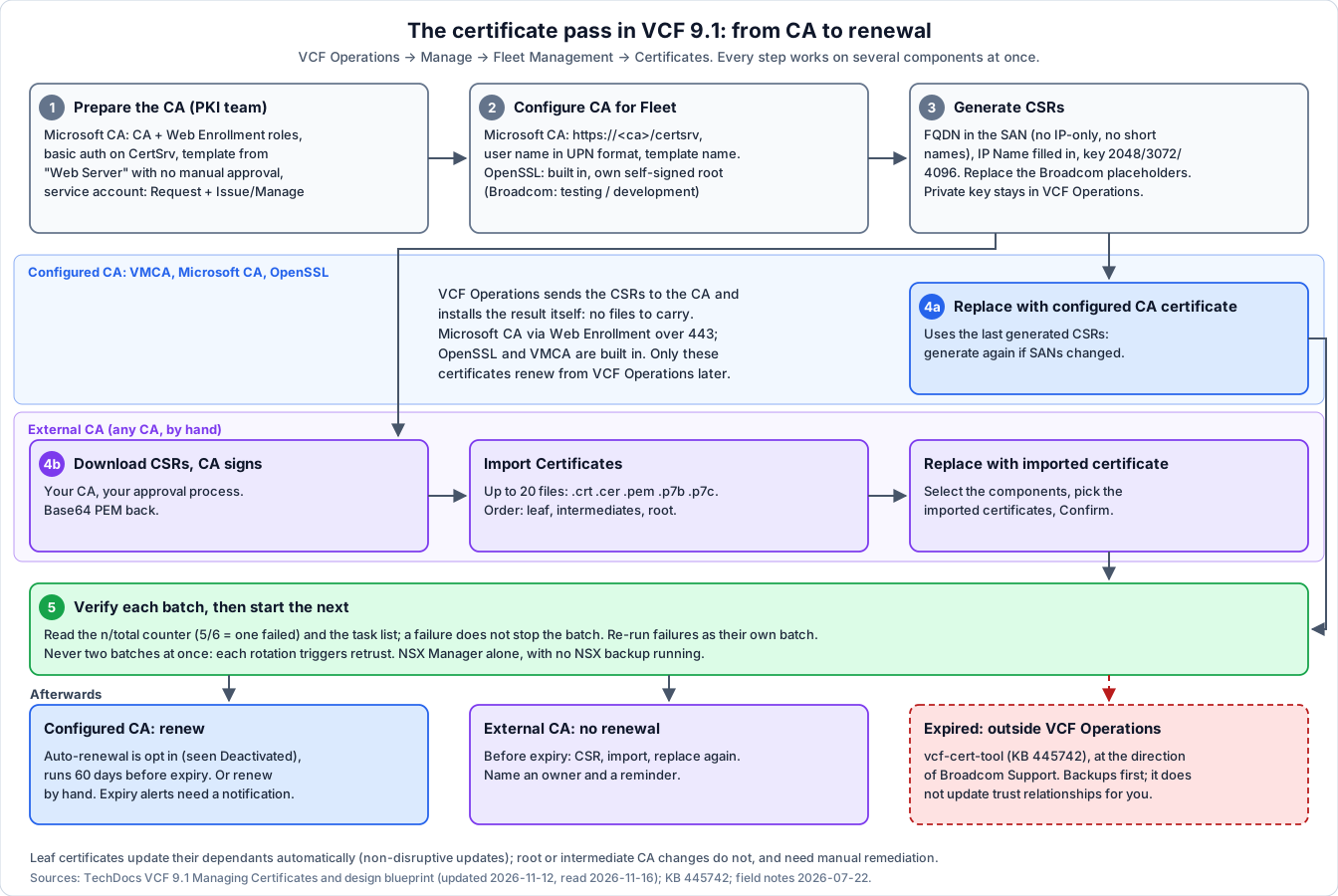
Evidence level: TechDocs VCF 9.1 Managing Certificates in VMware Cloud Foundation and its eleven sub-pages, and the Certificate Management design blueprint (five pages), all last updated 2026-11-12 and read verbatim on 2026-11-16; KB 445742 on the same day. The batch behaviour, the CSR placeholders and the NSX backup failure are field-verified 2026-07-22 on a real deployment. The Deactivated auto-renewal status on a fresh fleet is field-observed on the same deployment. OpenSSL as a fleet CA was verified in-product (#68, #69).
1. What VCF Operations manages
1.1 Three categories
| Category | VCF Operations can | Who changes it |
|---|---|---|
| User-managed | View, monitor, generate CSRs, import, replace, auto-renew: “full lifecycle management” | You, in VCF Operations |
| Externally managed | View and monitor, with “expiry alerts" | "The individual components own the management of these certificates. Users must replace or renew these certificates through the component’s own UI, API, or CLI.” |
| System-managed | Nothing visible; “alerts for unrecoverable issues only” | The component itself, “during routine operations such as upgrades” |
1.2 Which components
| VCF management components | VCF instance / domain components | Standalone |
|---|---|---|
| VCF Operations, VCF Automation, VCF Operations for networks, Log management, License server, Identity broker, VCF management services, Cloud proxy | ESX, vCenter, NSX Manager, SDDC Manager, VCF Operations HCX, Avi Load Balancer, vSphere Supervisor | ESX, vCenter, vSphere Supervisor |
- Cloud proxy, License server and vSphere Supervisor are covered from 9.1.1: “Starting with VCF 9.1.1 and later, certificate management coverage expands to include” those three.
- HCX and Avi need a management pack in VCF Operations before their certificates show up (Management Pack for VCF Operations HCX, Management Pack for VMware Avi Load Balancer).
- Older environments: VCF instances from 5.2, and standalone vCenter and ESX from 8.0 Update 3.
- ESX certificate mode changes. “Using VCF Operations to changes ESX certificates changes the vCenter vpxd.certmgmt.mode setting to Custom”, and from then on “all subsequent renewals must be managed centrally by using VCF Operations”.
1.3 Non-disruptive certificate updates
Since 9.0, a renewed or replaced leaf certificate is picked up by the components that depend on it: they “retrieve the new certificate, verify it, and update their trust stores without a manual re-trust”. Supported on ESX, vCenter, SDDC Manager, NSX, VCF Operations, VCF Operations for networks, HCX, VCF Automation, VCF management services, Log management, and Avi from 22.1.6.
Two limits to plan around:
- “NDC does not cover the replacement of root or intermediate CA certificates. When a root CA changes without a corresponding leaf certificate change, manual remediation is required.” Moving to a new CA hierarchy is therefore its own project, not a renewal.
- “NDC relies on the previous private key of the component.”
1.4 What VCF Operations can’t do
- Replace or renew root or intermediate certificates.
- Replace or renew an expired certificate. Use
vcf-cert-tool(§6.4). - Renew certificates from an external CA or self-signed ones. “You perform a 3-step manual replace (generate CSR, import the signed certificate, and replace).”
- Use VMCA as an intermediate of your CA. “VCF does not support configuring the VMCA as a customer intermediate CA for both greenfield and brownfield deployments that are converged or upgraded to VCF 9.1.”
- Manage ESX certificates whose private keys live outside the host (an HSM, for example): “the keys remain outside the visibility of VCF Operations, so VCF Operations cannot be used to manage those ESX host certificates.”
Broadcom’s design guidance on tools: manage certificates “exclusively through VCF Operations”; SDDC Manager’s certificate APIs only “for backward compatibility”; and “Do not use vCenter (API, UI, CLI) to manage ESX host or vCenter certificates once those certificates are being managed by VCF Operations”, because it “creates orphaned CSRs in vCenter and results in a “Source of Truth” conflict”.
2. Choose the CA
VCF Operations knows three configured CA types and, besides those, an external CA that you use by hand:
| CA | What it is | Fits |
|---|---|---|
| VMCA | The default; every component starts with a VMCA-signed certificate | Labs and isolated environments; Broadcom’s default for ESX (below) |
| Microsoft CA (MSCA) | “an enterprise CA that runs on Windows Server with Active Directory Certificate Services”, reached through Web Enrollment | An existing Microsoft PKI; renewals automatic |
| OpenSSL CA | ”a certificate service hosted within VCF Operations”; it creates its own self-signed root | Supported (verified in-product, #68 / #69), but Broadcom positions it for “testing or development environments”: it “cannot be chained into an existing external CA hierarchy” |
| External CA | Any CA: VCF generates the CSR, you get it signed, you import the result | Non-Microsoft enterprise PKI, or policies that need human approval per certificate |
What each can do (TechDocs, Certificate Operations by Certificate Authority Type):
| Operation | Configured CA | External CA | Self-signed |
|---|---|---|---|
| Generate CSR, import, replace | Yes | Yes | Yes |
| Auto-renew | Yes | No | No |
| Manual renew | Yes | No | No |
| Replace with a VMCA-signed certificate | Yes, from 9.1.1 | Yes, from 9.1.1 | Yes, from 9.1.1 |
The private key never leaves VCF. When you generate a CSR, “the corresponding private key is retained in the VCF Operations keystore. When the CA-signed certificate is imported in VCF Operations, the certificate is validated with the stored private key.” So you can’t import a certificate and key created entirely outside VCF. If policy demands externally generated keys, Broadcom’s design guide points to the API: “API-Based Automation is the only viable path. Native Auto-Renewal relies on VCF generating the keys.”
Design defaults from Broadcom’s blueprint:
| Component | Recommended | Trade-off |
|---|---|---|
| ESX hosts | ”Default VMCA”: “The default and recommended option for VCF fleets” | Host certificates “do not chain to the enterprise Certificate Authority”. If they must, use the enterprise CA through VCF Operations; that adds “a one-time certificate replacement activity” and a dependency on the CA |
| vCenter Machine SSL | ”Enterprise CA”, “to avoid browser and client trust warnings” | VMCA only for “lab or small, isolated environments” |
| Management components | ”Default CA-signed certificates on VCF management components should be replaced with certificates that are issued by a trusted enterprise Certificate Authority before going to production.” | — |
Once the hosts carry enterprise-CA certificates, new hosts must too:
40 §1.4.
How to keep them current (design guide, VCF Certificate Lifecycle Automation):
| Approach | When | Watch out |
|---|---|---|
| Auto-renewal | Most fleets | ”no administrative control over task scheduling”; “unsuitable for environments requiring short-lived certificates (less than 60 days) or manual approval workflows”; needs the CA reachable at all times |
| API-based automation | Change-controlled environments, custom schedules, external key custody | You own the workflow, its error handling and audit trail |
| Manual | ”Small or isolated environments”, or temporarily | ”high operational overhead at scale” |
3. Prepare a Microsoft CA
Four steps on the CA side, from TechDocs Prepare Your Microsoft Certificate Authority to Allow VMware Cloud Foundation to Manage Certificates. Hand this section to the PKI team.
1. Roles. Active Directory Certificate Services with Certification Authority and Certification Authority Web Enrollment.
Same server or not? TechDocs disagrees with itself (all pages last updated 2026-11-12). Configure a Certificate Authority says “With VCF Operations 9.1 and later” the two roles may be on different machines. The role and basic-authentication pages say “9.1.1 and later”, and: “For VCF Operations 9.1.0.x The Microsoft Certificate Authority and IIS must be installed on the same server.” Safe reading: same server on 9.1.0.x, separate servers allowed from 9.1.1.
2. Basic authentication on IIS: add the Basic Authentication role service (Web Server → Security), enable it on Default Web Site → CertSrv, restart the site.
3. Certificate template, duplicated from Web Server:
| Tab | Setting |
|---|---|
| Compatibility | Certification Authority Windows Server 2008 R2; certificate recipient Windows 7 / Server 2008 R2 |
| General | Display name, for example VMware (this is the name you give VCF) |
| Extensions → Application Policies | Remove Server Authentication |
| Extensions → Basic Constraints | Enable this extension |
| Extensions → Key Usage | Tick Signature is proof of origin (nonrepudiation), keep the rest |
| Subject Name | Supply in the request |
Then issue it: certsrv.msc → Certificate Templates → New → Certificate Template to Issue.
No manual approval on this template. Field-verified 2026-07-22: a bulk generate sends every selected CSR at once, and an approval-gated template turns that into a stalled queue rather than an error.
4. Service account with least privilege, a normal domain user (Broadcom’s
example svc-vcf-ca):
| Where | Allow | Deny (leave unticked) |
|---|---|---|
| The CA (certsrv.msc → Properties → Security) | Issue and Manage Certificates, Request Certificates | Read, Manage CA |
The VMware template (certtmpl.msc) | Read, Enroll | Full Control, Write, Autoenroll |
Network: VCF Operations must reach the CA’s Web Enrollment over 443
(07-firewall-ports.md; TechDocs points to the
Ports and Protocols tool).
4. Configure the CA for the fleet
VCF Operations → Manage → Fleet Management → Certificates → VCF Management → Configure CA for Fleet. One setting for the whole fleet.
Microsoft CA:
| Field | Value |
|---|---|
| CA Server URL | Must “begin with https:// and end with certsrv”, for example https://ca01.rainpole.io/certsrv |
| User Name | The service account in UPN format: “You must use the UPN format for the user name”, for example svc-vcf-ca@rainpole.io |
| Password | The service account’s password |
| Template Name | The template from §3, for example VMware |
OpenSSL: Common Name (TechDocs: “the FQDN of the SDDC Manager appliance”), Country, Locality, Organization, Organizational Unit, State (written out in full). VCF Operations then “generates a self-signed root CA certificate using the organization details you provide”: distribute that root to every client that must trust the fleet.
5. The certificate pass
5.1 Before you start
- Every component needs a DNS name. “VCF 9.1 enforces strict
certificate validation and requires an FQDN for the VCF component in the
Subject Alternative Name (SAN) field.” VCF Operations does RFC 6125
hostname checks, and “A certificate that contains only an IP address in
the SAN field does not satisfy the hostname verification requirement.”
Components deployed IP-only (VCF Operations for networks, see
05§B.2) need a name planned in Step 1. - No short names in a SAN. “Dot-less shortnames in the SAN field are not supported”, and “If a dot-less shortname is included alongside an FQDN or an IP address, the entire CSR generation fails.”
- Components without an FQDN (vSphere Supervisor can be IP-only) may use
“A domain-structured FQDN string, for example, supervisor.local or
component.internal”, a Punycode label, or
localhost, whichever your CA accepts. - External load balancer in front of a clustered component (VCF Operations, for example): the SAN must hold “the FQDNs of the load balancer and all component nodes”, and IP Name “the IP addresses of the load balancer and all component nodes”.
- Key sizes: RSA 2048, 3072 or 4096. Check the site’s crypto policy.
- No NSX backup in the window. Field-verified 2026-07-22: the one failure in a batch was an NSX Manager with an NSX backup running. Whether the rotation triggers a backup itself is not confirmed. Check no backup is running or scheduled, and give NSX Manager its own batch.
- A fresh VCF Operations backup before the first batch.
5.2 Generate CSRs
Manage → Fleet Management → Certificates → VCF Management (or a VCF instance or domain). Select one or more components, ellipsis → Generate CSR. Since 9.1 this works for many components at once.
| Field | What to enter |
|---|---|
| Organization, OU, Country, State, Locality | Your values. Field-verified 2026-07-22: the dialog pre-fills Broadcom’s own placeholders (Organization Broadcom, OU vcfms, United States, CA, Palo Alto). Agree the subject with the CA owner; the template may enforce it anyway |
| Email Address | Optional |
| Key Size | 2048 (default), 3072 or 4096 |
| Common Name | The component FQDN |
| Subject Alternative Name | Every FQDN, per §5.1 |
| IP Name | The component’s IPs: “To avoid issues with certificate validation, do not leave this field blank.” |
5.3a Replace with a configured-CA certificate
Select the components → ellipsis → Replace with configured CA certificate → select the CA → Confirm. Field-verified 2026-07-22: the dialog says “Last generated Certificate Signing Requests (CSRs) will be used for generating certificate(s)”. If a component’s SANs or FQDN changed since its last CSR, generate a new one first, or you sign a stale request.
5.3b Replace with an external-CA certificate
- Download the CSRs (ellipsis on the component) and have your CA sign them.
- Import: Certificates → ellipsis → Import Certificates. Up to
20 files at once;
.crt,.cer,.pem,.p7b,.p7c; base64 only. Pasted text goes as server certificate plus CA certificate, the CA part as intermediate(s) followed by the root. As files: “first, import the leaf certificate, then all intermediate certificates, and finally the root CA.” Click Validate, then Import. - Replace: select the components → Replace with imported certificate → pick the imported certificates → Confirm.
5.4 Run it in batches, one at a time
Field-verified 2026-07-22:
- Never two batches at once. The replace dialog requires you to acknowledge: “Each certificate rotation can trigger automated retrust operations across dependent components. To avoid system instability, wait for any current or ongoing batch operations to be completed before starting the next.” Plan fewer, larger batches with a settling pause.
- A batch doesn’t stop on a failure. The others carry on. The n/total
counter (
5/6= one failed) and the task list are the only signal. Re-run the failures as their own batch afterwards. - A suggested order: management components first, then per VCF instance vCenter, NSX Manager (alone), SDDC Manager, and ESX hosts in groups. This order is a planning suggestion, not a Broadcom requirement.
5.5 Check
- The certificate list: issuer, expiry and SANs per component. Certificate metadata is collected “every 6 hours” and right after a successful generate, replace, renew or configure-CA task.
- Each component’s own UI in a browser, from the jump host, with the enterprise root trusted: no warning.
- Integrations that pin certificates rather than trust a CA. Known one: the
SDDC Manager log agent from KB 396643 pins the Log Management certificate
and needs its script run again
(
05§B.6).
5.6 Checklist
| # | Item | Done |
|---|---|---|
| 1 | CA type chosen per component group (§2), auto-renewal or not | ☐ |
| 2 | Microsoft CA: roles, basic auth, template without approval, service account (§3) | ☐ |
| 3 | 443 from VCF Operations to the CA open | ☐ |
| 4 | CA configured for the fleet, UPN user name (§4) | ☐ |
| 5 | Every component has an FQDN with A + PTR; no short names in SANs | ☐ |
| 6 | Subject fields agreed; Broadcom placeholders replaced | ☐ |
| 7 | VCF Operations backup taken; no NSX backup in the window | ☐ |
| 8 | Batches planned, one at a time; NSX Manager alone | ☐ |
| 9 | Each batch: n/total complete, failures re-run | ☐ |
| 10 | Per component: issuer, expiry, browser check | ☐ |
| 11 | Pinned integrations redone (SDDC Manager log agent) | ☐ |
| 12 | Auto-renewal on where intended (§6.1); expiry alerts routed (§6.3) | ☐ |
6. Renewal and expiry
6.1 Automatic renewal
- Only for certificates signed by VMCA, Microsoft CA or OpenSSL CA: “VCF Operations cannot auto-renew certificates signed by an external CA.”
- “Automatic renewal happens 60 days before a certificate expires.”
- “You must manually renew a certificate before turning on auto-renewal if that certificate is due to expire in 60 days or less.”
- Set separately for VCF management components and per VCF instance: Certificates → VCF Management or a VCF instance → Activate Auto-renewal toggle.
- It is opt-in. Field-observed: on a freshly deployed 9.1 fleet the Auto-renewal Status column showed Deactivated. Don’t assume the fleet renews itself.
6.2 Manual renewal
For the same configured-CA certificates: select → Renew certificate → confirm. Several at once is possible. Not for root, intermediate, self-signed or expired certificates.
6.3 Watch expiry
- VCF Operations raises expiry alerts for user-managed and externally managed certificates. Broadcom recommends its “built-in alerts and notifications mechanism”, which “Requires integrations with the notification plugin in VCF Operations for outbound alerting”. Without a notification target nobody hears about them.
- External-CA certificates never renew themselves: each needs the three manual steps again before expiry. Name an owner (intake D6).
- Broadcom also recommends Audit Records in VCF Operations, keeping certificate events in Log Management, and giving certificate Manage and View permissions only to the roles that need them.
6.4 Expired certificates
VCF Operations can’t replace or renew an expired certificate. TechDocs
points to the VCF Certificate Management Tool (vcf-cert-tool,
KB 445742): a
menu-driven CLI that brings together the older repair tools (“vCert, CARR,
and certmgr”) for vCenter and ESX (8.0 U3+), NSX (4.2+), the Supervisor,
VCF Operations and Cloud Proxy (8.18+). Download: Broadcom Support Portal →
VMware Cloud Foundation 9 → release → Drivers & Tools → VCF certificate
tool.
The KB’s warnings: “vcf-cert-tool is intended to be used at the direction of Broadcom Support”, “Changes made could render a system inoperable”, and “Replacing certificates using this tool will not automatically update existing trust relationships.” Open a case first; take backups.
7. Trust outside the certificate pages
These are covered on their own pages; this list is where to look.
| What | Problem | Where |
|---|---|---|
| License Server → vCenter | VCF Operations pushes the License Server certificate into vCenter’s trusted roots; missing privileges, a proxy or a missing trust all give the same error. Manual workaround, and re-import after each License Server patch | 26 → License Server certificate trust |
| LDAPS for the Identity Broker | Domain controller certificate and the root CA in PEM | 12 → LDAPS |
| Avi controller → License Hub | Onboarding needs the controller’s leaf and CA certificate pasted together | 14-avi-load-balancer.md, 15-license-hub.md |
| Avi virtual service for VCF Automation | A CA-signed certificate matching the VCF Automation FQDN | 14-avi-load-balancer.md |
| Log Management ← ESX syslog over SSL | ESX accepts only the CA certificate, not a chain; a known defect after rotation (KB 459802 pending) | 31-log-management.md |
| SDDC Manager log agent | Pins the Log Management certificate; re-run after replacement | 05 §B.6 |
| New hosts after an enterprise-CA switch | Hosts for new domains must carry enterprise-CA certificates too | 40 §1.4 |
| The jump host | Import the enterprise root (or the OpenSSL root) so browsers and PowerCLI trust the fleet | 42-jump-host-powershell.md |
7.1 VVF
VVF has no fleet certificate pages. TechDocs: “you can manage certificates directly per component, or use the VCF Operations certificate management API to view and manage certificates centrally.” In VVF 9.1 the Log Management certificate is managed “by using VCF Operations API”. VCF Operations’ own trusted certificates and exceptions are under Operate → Administration → Control Panel → Trusted Certificates.
Sources
TechDocs VCF 9.1, last updated 2026-11-12, read verbatim on 2026-11-16:
- Managing Certificates in VMware Cloud Foundation: categories, components, CA types, operations per CA type, SAN rules, key sizes, collection, non-disruptive updates
- Configure a Certificate Authority and Prepare Your Microsoft Certificate Authority with its four steps: roles, basic authentication, template, service account
- Generate CSRs, Import Certificates, Replace with a Configured CA-Signed Certificate, Replace with an External CA-Signed Certificate
- Manually Renew and Set Up Automatic Renewal
- Managing Certificates in VMware vSphere Foundation and its Certificates page
- Design blueprint Certificate Management: approach, lifecycle automation, ESX, vCenter Machine SSL, recommendations
- KB 445742: VCF Certificate Management Tool for expired certificates