

Protection and Recovery: DR Between Two VCF 9.1 Sites — Build Guide
This guide sets up VCF Protection and Recovery 9.1 for disaster recovery of workloads between two VCF 9.1 sites: a protected site where the workloads run, and a recovery site they fail over to. It covers the licence decision, choosing a replication type, deploying and pairing the appliances, replication, inventory mappings, recovery plans, and testing, failover and failback.
Not covered here:
- Cyber / ransomware recovery and the clean room.
- Local vSAN snapshots for operational recovery.
- Multi-tenant DR through VCF Automation.
- DR of the management components themselves (VCF Operations, VCF Operations for networks). Broadcom covers that in its own runbook, VCF Fleet Disaster Recovery, which uses the same appliances; see §12.
Evidence level: sourced from Broadcom TechDocs (the Protection and Recovery 9.1 documentation, pages last updated 2026-10-20, and its 9.1 release notes), the configmax tool and the Ports and Protocols tool (both read 2026-11-04). Not lab- or field-verified in this repo. Steps for recovery plans, mappings and failover are summarised from the TechDocs Disaster Recovery section; read the page for your build before running them.
The sequence, end to end
- Decide the licence: replication only, or orchestrated DR
- Names, then and now
- Choose the topology and the replication type
- Plan: IPs, DNS, capacity, networks, firewall (incl. static routes for a routed replication subnet)
- Deploy the appliance on both sites
- Pair the sites
- Configure replication
- Inventory mappings
- Protection groups and recovery plans
- Test, migrate, recover, reprotect
- Monitor and back up the configuration
- The management components: VCF Fleet Disaster Recovery
- Upgrading from 9.0.x
- Limits, caveats and known issues
Steps 1–4 are planning. The licence decision in step 1 sets what you can build, so take it first.
1. Decide the licence
From Welcome to Protection and Recovery and, for Site Recovery Manager, KB 461219:
| You want | Licence | Notes |
|---|---|---|
| Replication with an RPO above 5 minutes, recovered by hand | Included with VCF | ”replicate with RPO higher than 5 minutes using standalone vSphere Replication” |
| Local vSAN snapshots | Included with VCF | Out of scope here |
| Orchestrated DR: recovery plans, non-disruptive tests, planned migration, failover, reprotect | Included with an active VCF or VVF subscription since 2 November 2026; not with perpetual licences | Site Recovery Manager only; see 1.1 for the key you need until 9.1.3 |
| An RPO under 5 minutes with vSAN snapshots and replication | Advanced Cyber Compliance (per core) | Not changed by KB 461219 |
| Cyber recovery (clean room, isolated recovery) | Advanced Cyber Compliance | Out of scope here; not changed by KB 461219 |
Replication without a recovery plan protects the data, not the service: failover then means registering and powering on every VM by hand, in the right order, with the right networks. For anything beyond a handful of VMs, plan for orchestrated DR: with a subscription it no longer costs extra.
1.1 Site Recovery Manager is now included
The sources disagree, so here is the timeline:
| Date | Source | Says |
|---|---|---|
| Last updated 20 October 2026 | Welcome to Protection and Recovery | ”If you want to use disaster recovery without cyber recovery, you can purchase a standalone VMware Site Recovery Manager license for VCF, VMware vSphere Foundation (VVF) or legacy vSphere software” |
| Effective 2 November 2026 | KB 461219 | ”VMware Site Recovery Manager (SRM)—formerly VMware Live Site Recovery (VLSR)—is no longer sold standalone. SRM is now included in VMware Cloud Foundation (VCF) and VMware vSphere Foundation (VVF). All existing active VCF and VVF subscription customers are entitled to SRM.” |
The KB is the newer source; follow it. What it means in practice:
- Who: active VCF and VVF subscriptions only. “Customers with perpetual VMware Cloud Foundation licenses, with or without active Support and Subscription (SnS), are not entitled” to it.
- What: only Site Recovery Manager, the orchestration layer. The KB says nothing about vSAN replication with an RPO under 5 minutes or cyber recovery; those still need Advanced Cyber Compliance.
- From 9.1.3: the entitlement comes with the subscription automatically (the KB expects 9.1.3 “between February 2027 - April 2027”), and then needs the protection and recovery appliance at 9.1.3 and vCenter at 9.1 or later.
- Until then: a term-limited key. Up to 10,000 protected VMs, expires 2 May 2027. Get it from the Support Portal, not the Licensing Portal: My Downloads → VMware Cloud Foundation (or VMware vSphere Foundation) → VMware Cloud Foundation 9 → version 9.1 or later → search Protection and Recovery → View Group → under Protection and Recovery (Key) → View Group → download the PDF that contains the key.
- The key replaces existing ones. It “cannot be split, combined, upgraded, or downgraded”, so you replace any existing SRM keys in vCenter with it, including in an existing site pair. It is a version 8.1 key, which “works on all supported SRM versions”.
- Plan the upgrade before 2 May 2027: move the appliances to 9.1.3 and vCenter to 9.1 or later before the key expires, or DR stops working.
2. Names, then and now
The 9.1 release notes, verbatim: “VMware Live Recovery has been renamed and integrated into VMware Cloud Foundation (VCF) as Protection and Recovery.” (9.1 release notes). Older documents, licences and support cases still use the old names.
| Older name | VCF 9.1 name | What it is |
|---|---|---|
| VMware Live Recovery | Protection and Recovery | The product family |
| VMware Live Site Recovery / Site Recovery Manager (SRM) | Protection and recovery server | Orchestrates recovery plans. Site Recovery Manager is still the name of its licence |
| vSphere Replication appliance | vSphere Replication, inside the appliance | Host-based replication |
| vSAN Data Protection | vSAN snapshots and replication | Snapshots and vSAN-to-vSAN ESA replication |
| Separate SRM and vSphere Replication appliances | One protection and recovery appliance | Since 9.1 (converged from 9.0.2.3 and earlier) |
3. Choose the topology and the replication type
3.1 Topology
Shared Recovery Site lists what’s supported: 1:1, fan-in / shared recovery site (N:1), fan-out / shared protected site (1:N) and many-to-many (N:N). This guide follows the 1:1 case: one protected and one recovery site.
For anything other than 1:1:
- Each protection and recovery pair shares an extension ID, set when you install. “Each pair of protection and recovery instances in the shared recovery site configuration must use a different protection and recovery extension ID.” If the first pair used the default ID, every later pair needs its own custom ID. Choose the IDs before the first deploy.
- The extra instances at the shared site are scale-out appliances, which hold only the protection and recovery server. You can deploy up to nine per vCenter (Deploy Protection and Recovery).
3.2 Replication type per workload
| Type | Source | Target | When |
|---|---|---|---|
| vSphere Replication (enhanced) | Any datastore | Any datastore | The default. Host-based, per VM, no storage-array dependency |
| vSAN replication (vSAN snapshots and replication) | Any storage, since 9.1 | vSAN ESA cluster only | Immutable snapshots, daily / weekly / monthly schedules, tag-based protection groups; RPO under 5 minutes needs Advanced Cyber Compliance |
| Array-based replication | Array LUNs / volumes through a Storage Replication Adapter (SRA) | The paired array | Large datastores already replicated by the array; check the array and SRA in the compatibility guide |
Two rules that shape the design:
- vSAN replication needs a vSAN ESA recovery cluster. From Create Site and Cluster Pairing: “you must pair two clusters, one on the local site and one on the remote site. The target cluster must be a vSAN ESA cluster.” If the recovery cluster isn’t vSAN ESA, you use vSphere Replication or array replication.
- vVols are on the way out. “Protection and Recovery 9.1 is the last release that supports vSphere Virtual Volumes. It is recommended to migrate your Virtual Volumes replications to array-based replication.” (9.1 release notes). Don’t design new DR on vVols.
Array-based replication doesn’t support NFS 4.1 datastores. vSphere Replication does (9.1 release notes).
4. Plan: IPs, DNS, capacity, networks, firewall
4.1 Appliances
One appliance per vCenter, on both sites. From System Requirements:
| Appliance | vCPU | RAM | Disk | NIC |
|---|---|---|---|---|
| Protection and recovery appliance | 8 | 24 GB | about 800 GB (5 disks) | 1 Gbit |
| Scale-out appliance (only for > 5,000 VMs or a shared site) | 4 | 8 GB | about 110 GB (5 disks) | 1 Gbit |
- FQDN and IP per appliance, with forward and reverse DNS. TechDocs: “Use fully qualified domain names (FQDN) whenever possible.”
- ESX 9.0 or later for VCF 9.1.x (Deploy Protection and Recovery).
- The recovery-site vCenter and appliance must not depend on the protected site: “During a disaster recovery, protection and recovery and vCenter must be up and running on the recovery site.” (Deployment Models). That includes DNS, NTP, AD and the identity provider at the recovery site.
Example values: pnr01.sfo.rainpole.io (protected),
pnr01.lax.rainpole.io (recovery).
4.2 Capacity at the recovery site
Size the recovery cluster for the VMs you’ll fail over, plus the space the replicas and their snapshots use. During a test, the test VMs run next to the replicas, so plan for both.
4.3 Networks at the recovery site
Decide how recovered VMs get their network, before you set up mappings:
- Re-IP: the VMs come up in different subnets at the recovery site, and the recovery plan changes their IPs (IP customisation). Needs DNS updates and clients that use names.
- Same subnets: the recovery site has the same subnets, as NSX segments or VPC subnets that are kept down or isolated until failover. No re-IP, but the routing has to move at failover.
- A test network that is isolated from production, for non-disruptive tests.
4.4 Firewall flows
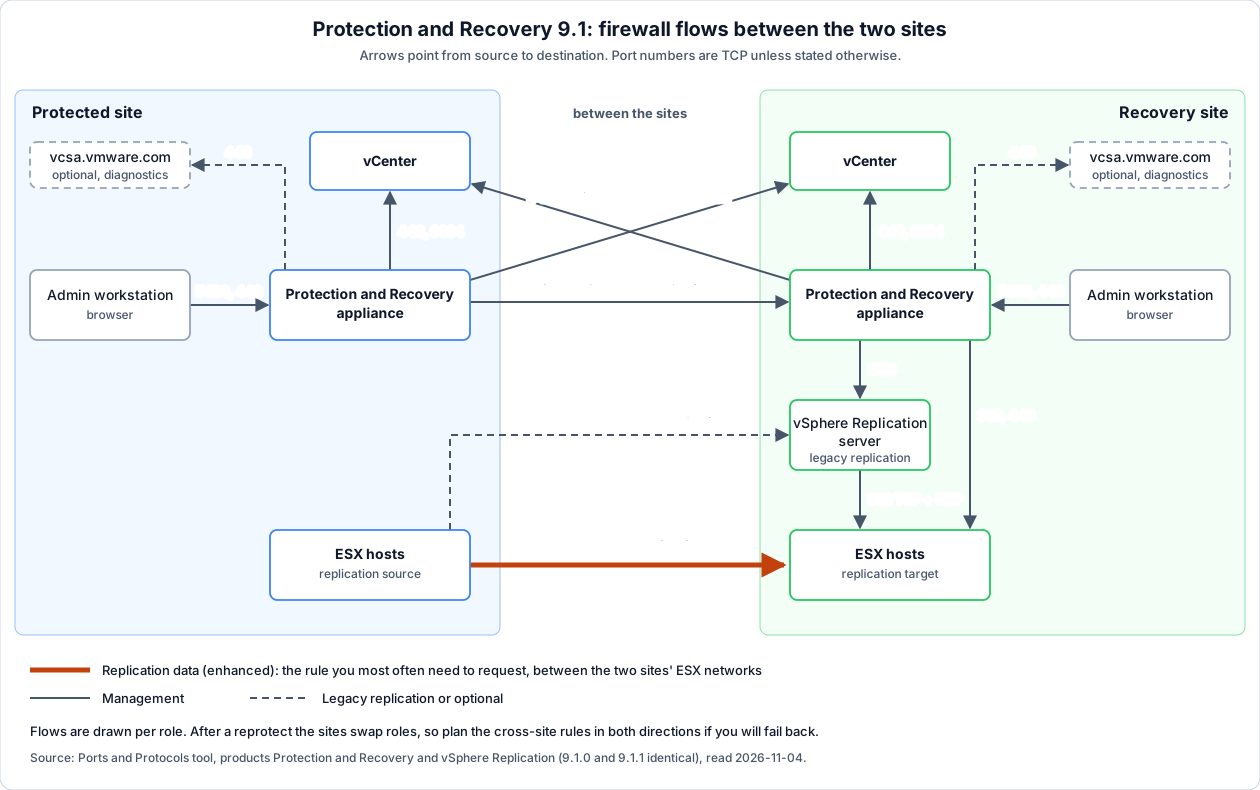
From the Ports and Protocols tool (products Protection and Recovery and vSphere Replication; the 9.1.0 and 9.1.1 listings are identical, read 2026-11-04). The picture shows the same flows per site; the table below is the reference.
| Source | Destination | Port(s) | Proto | Purpose |
|---|---|---|---|---|
| Appliance (protected) | Appliance (recovery) | 443 | TCP | Site-to-site management |
| Appliance | Local and remote vCenter | 443 | TCP | Management |
| Local appliance | Remote appliance | 5480 | TCP | vSphere Replication management |
| ESX (protected site) | ESX (recovery site) | 32032 | TCP | Enhanced vSphere Replication traffic |
| ESX (protected site) | vSphere Replication server (recovery site) | 31031, 32032 | TCP | Legacy vSphere Replication traffic |
| vSphere Replication server (recovery) | ESX (recovery, same site) | 902 | TCP + UDP | Intra-site replication management |
| Appliance | vSphere Replication server | 8123 | TCP | Intra-site management |
| Appliance | Local vCenter | 9084 | TCP | Intra-site |
| Recovery-site appliance | Recovery-site ESX | 902, 443 | TCP | Internal services |
| Browser / admin workstation | Appliance | 5480, 443 | TCP | Appliance management, UI |
| Appliance | vcsa.vmware.com | 443 | TCP | Diagnostics (optional) |
Enhanced replication sends the data from the protected site’s ESX hosts
straight to the recovery site’s ESX hosts. The rule you most often need to
request is therefore between the two sites’ ESX networks, not to an appliance.
Add these flows to 07-firewall-ports.md §H.
4.5 A replication network in its own subnet: static routes
If replication runs over its own VLAN and subnet at each site, and the two sites’ replication subnets are different and routed, you need static routes. Tagging the VMkernel adapter is not enough.
Why: vSphere Replication runs only on the ESX default TCP/IP stack. “You cannot enable the vSphere Replication traffic on a custom TCP/IP stack on the ESXi host” (Isolating the Network Traffic of vSphere Replication, 9.0; KB 432747). The default stack has one default gateway, normally the management gateway. The vSphere Replication / vSphere Replication NFC tag says which vmk the service uses; it does not change routing. A destination outside the local replication subnet goes to the default gateway, so the traffic leaves via management (KB 430898). Broadcom’s answer is tagging and static routes (KB 432747).
Field-verified: setting Override default gateway for this adapter on the replication vmk (VMkernel adapter → Edit → IPv4 settings) did not fix it; replication still needed static routes. Broadcom doesn’t mention that option for replication either.
Where the routes go:
| Where | Route to | Via | Notes |
|---|---|---|---|
| Every ESX host, protected site | the recovery site’s ESX replication subnet and the recovery site’s appliance replication IP (both TCP 32032) | the local replication gateway | the gateway must be in a subnet where the host has a vmk (KB 308786); why both: see below |
| Every ESX host, recovery site | the protected site’s replication subnet | the local replication gateway | the reverse routes, for reprotect and failback (isolation page) |
| Appliance replication NIC, both sites | the other site’s ESX replication subnet(s) | the replication NIC’s gateway | ”Source VRMS appliance must have routes for the target ESXi cluster” and the reverse (KB 384776); missing routes show as error 31031 (KB 395034) |
ESX hosts. The vSphere Client has no screen for host static routes (only
the stack’s default gateway, which would move management too). Use esxcli
or PowerCLI (PowerShell 7 and VCF PowerCLI on the jump host:
42-jump-host-powershell.md):
# per host
esxcli network ip route ipv4 add -n 172.28.20.0/24 -g 172.27.20.1
esxcli network ip route ipv4 list
vmkping -I vmk3 172.28.20.11      # replication vmk -> remote host's replication vmk
# whole cluster (PowerCLI)
Get-Cluster sfo-w01-cl01 | Get-VMHost |
New-VMHostRoute -Destination 172.28.20.0 -PrefixLength 24 -Gateway 172.27.20.1 -Confirm:$falseRoutes are per host: add them to your host-prep for every host you add later (cluster expansion, host replacement), or new hosts replicate over management.
Appliance. The appliance management interface (VAMI) supports only one
default gateway (KB 384776). Add routes in the NIC’s
systemd-networkd file (Configure a Static Route on an Additional VM
Network Adapter, 9.0):
Enhanced replication talks to the appliance too. The data goes ESX to ESX,
but the source host’s hbr-agent first logs in to the recovery site’s
replication appliance on TCP 32032 (the brokered server). KB
393268 shows it failing as “Failed to login to brokered server:
##.##.##.## : 32032”, alongside “Ensure ports 32032 are open between source
and destination ESXI hosts”. So a healthy enhanced replication has two
kinds of 32032 sessions from a source host:
| Session | What | Volume |
|---|---|---|
| source ESX → recovery-site appliance | login / brokering (control) | small |
| source ESX → recovery-site ESX | the replication data | the bulk |
A session to the appliance on 32032 is therefore not proof of legacy replication. Only appliance sessions and no sessions to recovery-site hosts means the data is not going host to host: either a legacy replication, or the host-to-host path is broken (32032 not open between the hosts, KB 392287; or a missing route). Legacy replication uses the appliance as the data target (31031, 32032).
# /etc/systemd/network/10-eth1.network   (eth<N> = the replication NIC)
[Route]
Gateway=172.27.20.1
Destination=172.28.20.0/24
Then systemctl restart systemd-networkd and check with ip r. Add
GatewayOnLink=yes in [Route] if the route doesn’t validate. Appliance
upgrades can drop these routes: back them up before an upgrade and re-add
them afterwards (KB 384776).
Tags: which vmk replication uses
There is no setting in Protection and Recovery that picks a vmk. ESX picks it from the VMkernel service tags (vSphere Client: Host → Configure → VMkernel adapters → Edit → Enabled services):
| Site | Tag on the replication vmk | Effect |
|---|---|---|
| Source (protected) | vSphere Replication | outgoing replication data leaves via this vmk (source) |
| Target (recovery) | vSphere Replication NFC | incoming data is written to the datastore via this vmk (target) |
- Tag both services on both sites: after reprotect the roles swap.
- No tag means replication falls back to vmk0 (KB 384776).
- The tag picks the source vmk; the routing table still picks the gateway. Tag and route together, as above.
- With enhanced replication (ESX to ESX, TCP 32032) the tags and routes are all
there is. For legacy replication, or to separate the appliance’s own traffic,
give the appliance a second vNIC in the replication network (a third for NFC
only if you want) (isolation page), set that NIC’s IP as the
address for incoming replication traffic in the appliance management
interface (
https://<appliance>:5480; older vSphere Replication called the field IP Address for Incoming Storage Traffic, the 9.1 label is not checked here), and add its routes as shown above. - Changing tags or routes affects new sessions. Check with step 5 below whether the local IP has moved to the replication vmk; if a replication still shows vmk0, a pause/resume or a sync starts a new session (not tested here, not in Broadcom’s docs).
Verify from the ESX Shell (SSH). The tools are standard in the ESX
shell; option sets vary by build, so check traceroute --help / nc -h.
# 1. Routes and vmk IPs
esxcli network ip route ipv4 list
esxcli network ip interface ipv4 get

# 2. Which path does ESX itself pick? (no -i/-s = the default-stack routing)
traceroute 172.28.20.11
traceroute -i vmk3 172.28.20.11            # forced out of the replication vmk

# 3. Reachability and MTU via the replication vmk
vmkping -I vmk3 172.28.20.11
vmkping -I vmk3 -d -s 8972 172.28.20.11    # jumbo frames end to end

# 4. Is the replication port open? (from the replication vmk's IP)
nc -z -v -w 3 -s 172.27.20.21 172.28.20.11 32032

# 5. Which local IP do live replication sessions use?
esxcli network ip connection list | grep 32032
Reading the results:
- A plain
traceroutewhose first hop is the management gateway means the static route is missing or wrong. ncsucceeded = path and port open; timeout = firewall, missing route or asymmetric return path; refused = path works, nothing listens. The ESX firewall filters outbound too: ifnctimes out, checkesxcli network firewall ruleset rule list | grep 32032before blaming the network.- In step 5, a local address equal to the vmk0 IP means replication still runs over management; after the route is in place it should be the replication vmk’s IP.
- Also in step 5, look at the remote addresses: for an enhanced
replication expect one to the recovery-site appliance (broker) and
ones to recovery-site ESX hosts (data). Test both paths:
nc -zv -s <repl-vmk-ip> <recovery-esx-repl-ip> 32032and the same to the appliance’s replication IP.
5. Deploy the appliance on both sites
Protection and Recovery isn’t deployed from VCF Operations: TechDocs documents only the OVF wizard, and neither VCF Operations release note for 9.1.0 or 9.1.1 lists it as a lifecycle-managed component. Per Deploy Protection and Recovery:
- Download the OVA (or the ISO, and mount it) from the Broadcom Support Portal. For a shared site you also need the scale-out OVA.
- In the vSphere Client on the protected site: right-click a host →
Deploy OVF Template → the OVA (
Protection-and-recovery-9.1.x.x.<build>_OVF10.ova) or an online URL. - Name and folder (the name must be unique in the folder), cluster or host, EULA, datastore and storage policy, network.
- Customize template: network settings (DHCP or static), passwords, and SSH if you want it.
- Finish, and repeat on the recovery site.
Then in the appliance management interface (https://<appliance>:5480),
connect each appliance to its own vCenter. If the vCenters are in Enhanced
Linked Mode, pick the right one from the list, because you’ll see both
(Deployment Models). For a shared site, set the extension ID here.
You can deploy only one protection and recovery appliance per vCenter, plus up to nine scale-out appliances (Deploy Protection and Recovery). The appliance uses its embedded vPostgres database only. Once both sites are configured, the protection and recovery plug-in and the vSAN snapshots and replication plug-in appear in the vSphere Client (Deploying and Configuring the Appliance).
6. Pair the sites
The recommended path, per Create Site and Cluster Pairing (you must be in the vCenter Administrators group):
- vSphere Client → the vCenter → Configure → Protection and Recovery → Pair Sites.
- Enter the remote vCenter host name and credentials → Next.
- Accept the vCenter certificate, then the protection and recovery certificate.
- Review → Pair.
- For vSAN replication, also pair the clusters: one local, one remote. The remote cluster must be vSAN ESA.
If you only use vSphere Replication or array-based replication, you can pair from the protection and recovery UI instead.
For two-factor authentication (RSA SecurID or Smart Card), the vCenters on both sites must be in Enhanced Linked Mode and direct replication partners, and you pair with the vCenter administrator credentials (9.1 release notes).
7. Configure replication
vSphere Replication, per VM or group of VMs:
- Pick the target datastore and storage policy at the recovery site.
- Set the RPO: above 5 minutes is included with VCF, under 5 minutes needs Advanced Cyber Compliance.
- Point-in-time instances, if you need to roll back further than the last replica.
- Quiescing, if the guest supports it.
Seeding: 9.1 can start a new replication from an existing replica and send only the changes, which saves the full first sync over the WAN (9.1 release notes).
vSAN replication:
- Protection groups with snapshot schedules (daily / weekly / monthly) and retention.
- Immutable snapshots where you need them.
- Membership by VM tag, so new VMs with the tag are protected without a manual step.
Array-based replication:
- Install the array vendor’s SRA on both appliances.
- Register the array managers and enable the array pairs; the replicated datastores then appear.
Upgraded environments: after an upgrade to 9.1, every vSphere Replication replication must be reconfigured to enhanced replication (9.1 release notes).
8. Inventory mappings
Mappings tell the recovery site where things go. Set them once per site pair, in both directions if you’ll fail back:
| Mapping | Maps | Watch out for |
|---|---|---|
| Network | Protected port group / segment → recovery port group / segment | NSX segments and VPC subnets at the recovery site must exist first |
| Test network | → an isolated network for tests | Tests must never touch production |
| Folder | VM folders | |
| Resource | Clusters / resource pools | |
| Storage policy | VM storage policies | Needed for vSAN and vSphere Replication targets |
| Placeholder datastore | Where placeholder VMs live at the recovery site | Small, but must exist on each site for failback |
9. Protection groups and recovery plans
- Protection group: a set of VMs protected together, by one replication type. Up to 1,500 VMs per group and 500 groups in total (configmax, see §14).
- Recovery plan: one or more protection groups, plus:
- priority groups (1 to 5 in Site Recovery Manager) and VM dependencies, so databases start before the application servers that use them
- IP customisation for re-IP recovery (§4.3)
- scripts and prompts at the points where people have to act (DNS change, load balancer, a sign-off)
Build one recovery plan per application or per business service, so you can test and fail over one service without the others. Keep a site-wide plan for a full disaster. 250 recovery plans are allowed, with up to 2,000 VMs and 250 protection groups per plan.
10. Test, migrate, recover, reprotect
Recovery plans run in four ways. This is the long-standing Site Recovery Manager workflow, and the 9.1 server keeps it. The 9.1 pages sit under Disaster Recovery → Using Protection and Recovery (Disaster Recovery); read the procedure for your build before running one.
| Operation | Protected site | What happens |
|---|---|---|
| Test | Keeps running | Recovers copies of the VMs into the test network; Cleanup removes them afterwards |
| Planned migration | Up | Syncs the latest changes, shuts the VMs down cleanly and recovers them. No data loss; stops on errors |
| Disaster recovery | Down or unreachable | Recovers from the last replica; carries on past errors on the protected side |
| Reprotect | Back up | Reverses the direction, so the old recovery site becomes the protected site |
Failback is a reprotect followed by a planned migration back.
A routine that makes failover work when it’s needed:
- Test after every change to a recovery plan, and on a schedule (for example quarterly), and keep the test report.
- Run a planned migration at least once before go-live, during a maintenance window.
- After a real failover, reprotect as soon as the old site is back, so the workloads are protected again.
At most 10 recovery plans run at once, and 2,000 VM recoveries can start at the same time (configmax).
11. Monitor and back up the configuration
11.1 Monitor
VCF Operations has Protection and Recovery dashboards (Protection and Recovery Dashboards) and management packs for the protection and recovery server, vSphere Replication and vSAN snapshots and replication (see the release notes index). Watch for:
- replications not meeting their RPO
- recovery plans whose last test is old or failed
- placeholder VMs missing at the recovery site
Automation: 9.1 is the last release with the VCF Operations orchestrator plug-ins for protection and recovery and for vSphere Replication. New automation should use the Protection and Recovery REST API Gateway and the DR REST plug-in (9.1 release notes).
11.2 Back up the configuration (export / import)
The appliance has no built-in scheduled backup of its own configuration, the
way SDDC Manager, vCenter or NSX do. What Broadcom gives you is the
Configuration Import/Export Tool (Exporting and Importing Protection and
Recovery Configuration Data). It ships with the appliance in
/opt/vmware/impex and is also available as a standalone .jar.
What it exports (to one XML file): version and build, local and remote site
names, inventory mappings, placeholder datastores, advanced settings, array
managers with SRA information, protection groups, recovery plans, power-on and
power-off settings and shutdown actions. Not in that file: the replications
themselves. vSphere Replication has its own export tool
(/opt/vmware/vr-impex-tool), see Exporting and Importing Replication
Configuration Data (9.0.3 page; no 9.1 page found yet).
Prerequisites:
- Export: a working site pair, with the appliance up on both sites.
- Import: a clean installation, registered with the same vCenter or one with the same inventory. Import the vSphere Replication data first, then the Protection and Recovery data.
- Standalone tool: Java 21.0.x or later on 9.1 (the 9.0 docs say 11.0.x),
and
JAVA_HOMEset. Use a service account or SSO administrator credentials; solution-user authentication is not supported.
Three ways to export:
| Route | How | Credentials |
|---|---|---|
| UI | vSphere Client → Site Recovery → Open Site Recovery → site pair → View Details → Summary → Export/Import SRM Configuration → Export → Download (UI export) | your session |
| Script on the appliance | As root (su): sh /opt/vmware/impex/bin/export.sh, which writes to /opt/vmware/impex/exports/ (script export) | none (script generated during pairing) |
Standalone .jar | java -jar import-export.jar --exportInteractive (or --export with options, --exportPath <dir>) (syntax) | service account or SSO admin |
Automate it
The export is manual by default, but the documented way to automate it is a cron job on the appliance that runs the same script (cron export). As root on the appliance:
su
crontab -e
# hourly, Broadcom's example:
0 * * * * /usr/bin/sudo /bin/bash /opt/vmware/impex/bin/export.sh
Daily is usually enough; export after every recovery-plan change as well. Two things the cron job does not do for you:
- Get the file off the appliance. The exports land in
/opt/vmware/impex/exports/on the appliance you would be restoring. Copy them somewhere else, for example a second cron line thatscps the newest file to the SFTP backup target from08-backup-target.md, or pull them from that server on a schedule. - Prune old files. Add a cleanup (for example
find ... -mtime +14 -delete) so the exports directory doesn’t fill the appliance disk.
Run it on both sites: each appliance holds its own side of the pair. For vSphere Replication, schedule its tool the same way if you rely on it.
Untested here. The cron route is documented on the 9.0 pages; the 9.1 parent page describes the same tool in the same location. A cron entry or extra script on the appliance may not survive an appliance upgrade or redeploy, so check it after every upgrade. Test a restore (import into a clean appliance) at least once.
Restore (UI or standalone):
- UI: on a clean appliance, Summary → Export/Import SRM Configuration → Import, browse to the XML. If a stage fails, download the CSV report (UI import).
- Standalone, from
/opt/vmware/impex:java -jar import-export.jar --importInteractive --path <exported.xml>. By default it retries VM recovery settings 5 times with a 10 000 ms delay; raise with--delay/--retries(import). - 9.1 caveat: the import applies the recovery settings of a protected VM only once, even if the VM is in several recovery plans. Check those VMs in every plan after an import (9.1 release notes).
12. The management components: VCF Fleet Disaster Recovery
This guide protects workloads. Recovering the fleet’s own components after
an instance or site failure is a separate Broadcom runbook,
VCF Fleet Disaster Recovery. It uses Protection and Recovery to fail
over and fail back VCF Operations and VCF Operations for networks to another VCF
instance in the same fleet. It has PowerShell automation through the
VMware.CloudFoundation.InstanceRecovery module.
If you do both, they share the same appliance pair and limits: plan recovery plans, protected-VM counts and the recovery-site capacity for both together.
The 9.1 P&P workbook’s hidden Site Protection & DR sheet comes from the older validated design for protecting the management applications (separate vSphere Replication and VMware Live Recovery appliances, Aria naming). It doesn’t cover workload DR, and doesn’t match 9.1’s single appliance. Don’t transfer answers into it.
13. Upgrading from 9.0.x
From Convergence and Upgrade: “When using version 9.0.2.3 and earlier, you must converge to the combined protection and recovery appliance. Versions 9.0.3 and later support in-place upgrade.”
- Converging from VMware Live Site Recovery 9.0.2.3, vSphere Replication 9.0.2.3 or vSAN Data Protection 8.0 U3 starts by deploying the 9.1 appliance on both sites (9.1 release notes).
- All vSphere Replication replications move to enhanced replication.
- Planned migration of array-replication groups from a 9.1 site to a 9.0.3 site isn’t supported, so upgrade both sites in the same window.
- Check the paths in the Interoperability Matrix → Upgrade Path.
14. Limits, caveats and known issues
14.1 Scale limits
From configmax, product Protection and Recovery. 9.1.0 and 9.1.1 are the same except for vSAN replication.
| Limit | 9.1.0 | 9.1.1 |
|---|---|---|
| Protected VMs, total | 5,000 | 5,000 |
| VMs protected with vSphere Replication | 5,000 | 5,000 |
| VMs protected with array-based replication | 5,000 | 5,000 |
| VMs protected with vSAN replication | 1,000 | 5,000 |
| VMs protected with vVols replication | 500 | 500 |
| VMs on array replication with stretched storage | 1,000 | 1,000 |
| VMs per protection group | 1,500 | 1,500 |
| Protection groups, total | 500 | 500 |
| Recovery plans | 250 | 250 |
| Protection groups per recovery plan | 250 | 250 |
| VMs per recovery plan | 2,000 | 2,000 |
| Replicated datastores (array-based) | 500 | 500 |
| Recovery plans running at once | 10 | 10 |
| VM recoveries started at once | 2,000 | 2,000 |
Above 5,000 protected VMs you add scale-out appliances (§3.1).
14.2 Caveats
From the 9.1 release notes, Caveats and Limitations. Check every protected VM against these:
| Caveat | Effect |
|---|---|
| VMs with persistent memory (PMem) | Can’t be protected |
| Disks larger than 62 TB | No replication, and the VM won’t power on |
| 4Kn native datastores | Not supported for vSphere Replication |
| Shared VMDKs | Can’t be replicated |
| Storage policies with IO filters | Not allowed on source or target |
| Disk resize not a multiple of 512 bytes | Replication fails until fixed |
| Encrypted VMs | Need vSphere 7.0 U2c or later |
| Uni-processor FT | Turned off on the recovered VM |
| Flash Read Cache | Disabled after recovery and the reservation set to 0; note it first |
| Replications within one vCenter (ROBO) | Not supported with VMware Live Recovery activated |
| Array-based replication on NFS 4.1 | Not supported (vSphere Replication is) |
References
- Welcome to Protection and Recovery (licensing)
- KB 461219: Access to VMware Site Recovery Manager for existing VCF and VVF subscription customers (Site Recovery Manager included since 2 November 2026)
- Deploying and Configuring the Appliance, System Requirements, Deployment Models, Deploy Protection and Recovery
- Create Site and Cluster Pairing, Shared Recovery Site
- Convergence and Upgrade
- Disaster Recovery (Using Site Recovery), Dashboards
- Protection and Recovery 9.1 release notes, release notes index
- VCF Fleet Disaster Recovery
- Configuration export / import: overview (9.1), UI export, script export, cron export, UI import, standalone import, tool syntax, vSphere Replication export / import (child pages and vSphere Replication: 9.0 / 9.0.3 docs)
- configmax, Ports and Protocols, Interoperability Matrix, Broadcom Compatibility Guide