

Private AI Foundation — Dark-Site Build Walkthrough
The step-by-step companion to 33-private-ai-foundation.md.
Guide 33 says what has to be staged and why; this page is the order of
work and the commands for a disconnected (air-gapped) build, from the bastion
host to the point where the Private AI Foundation Quickstart can run.
Evidence level: commands and values are taken from the VMware Private AI Foundation with NVIDIA 9.1 PDF and KB 388470 (both read 2026-10-30). Not run on a build in this repo yet. Where a step is general practice rather than Broadcom’s text, it says so.
Read 33 §4
first for the artifact list and the capacity planning. Everything below assumes
the GPU workload domain and Supervisor exist
(32-gpu-hosts.md, 33 §3).
The flow
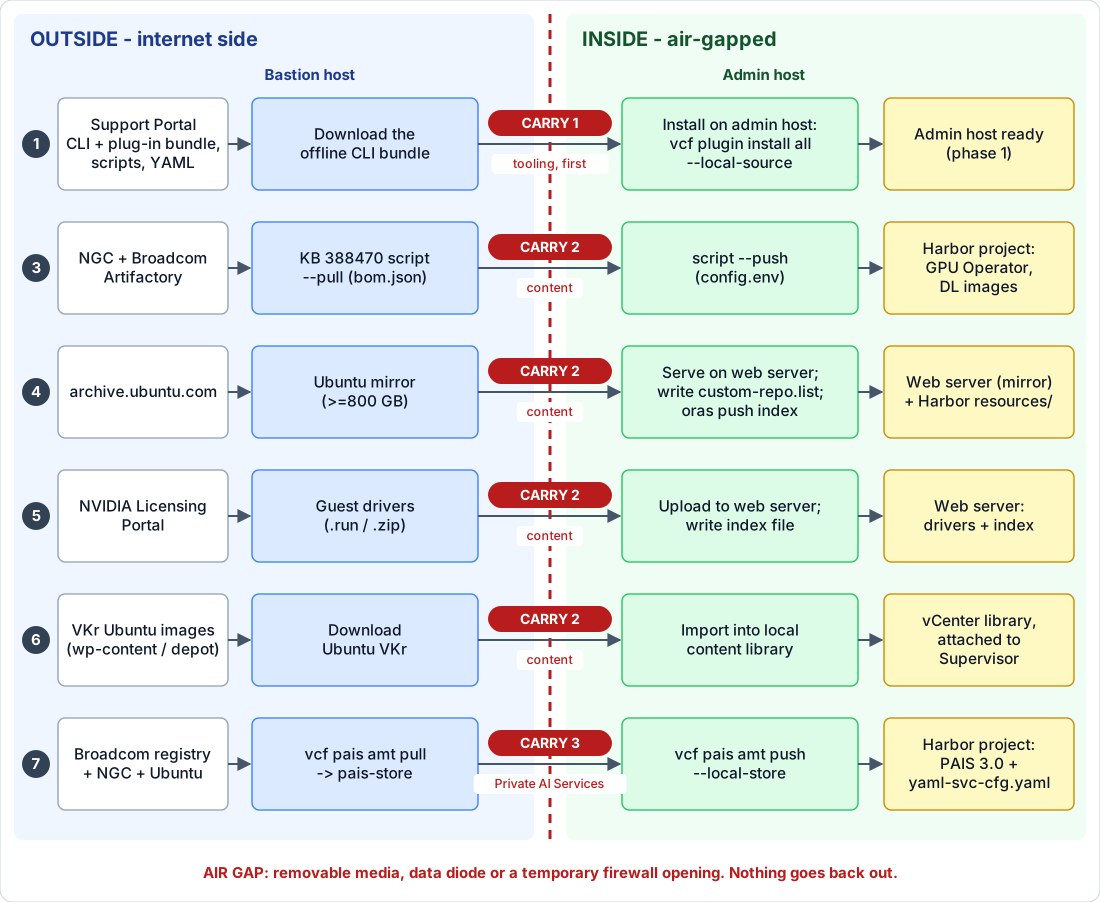
Click the picture to open it full size.
Read it left to right: source → bastion (pull) → carry across the air gap → admin host (push) → destination. The red badge on each arrow is the carry (1 tooling, 2 content, 3 Private AI Services); the schedule is in the three carries. Every lane repeats on each refresh. The numbers are the phases below.
The order, and who does what
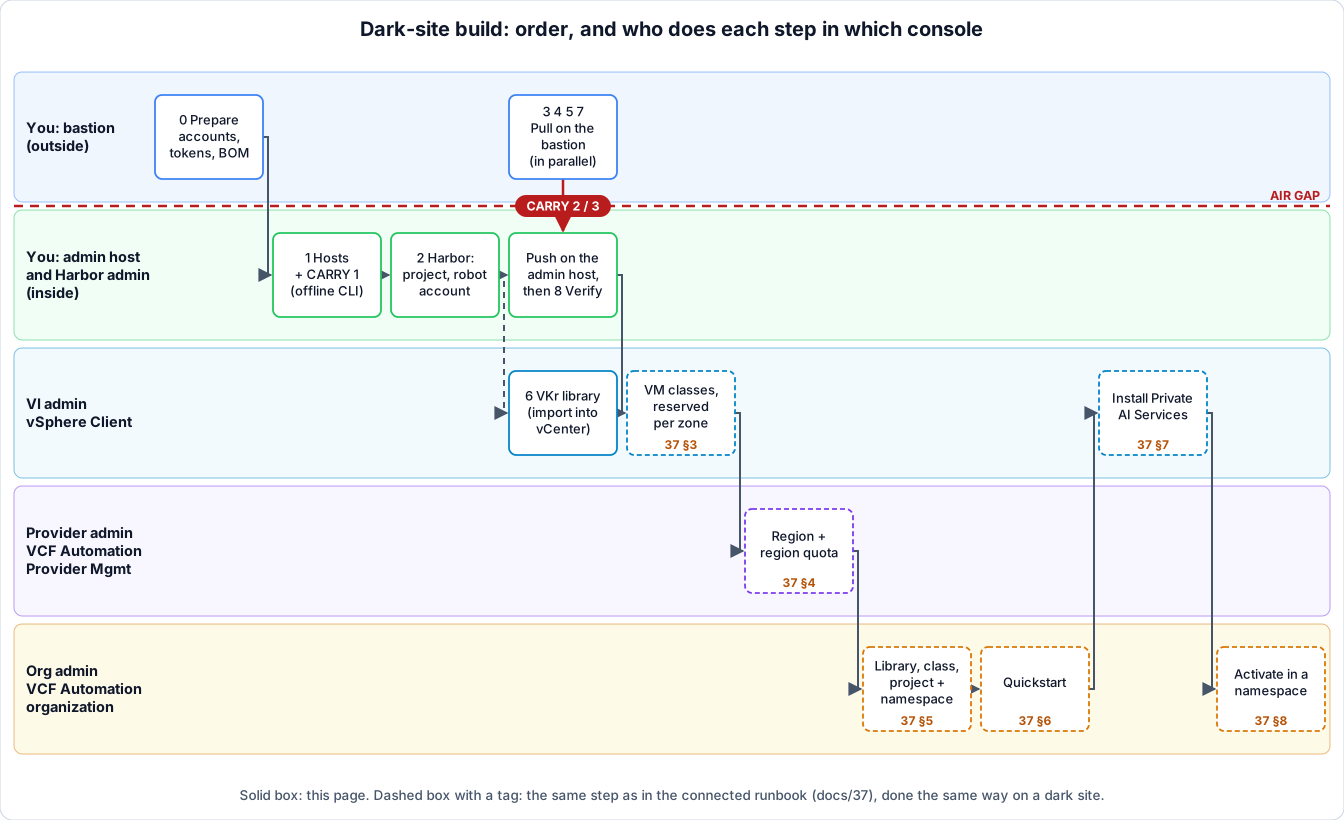
Click the picture to open it full size.
The first picture shows what crosses the air gap; this one shows the order
and the owners. Phases 3, 4, 5 and 7 are pulled on the bastion and pushed on the
admin host in parallel, and the VKr library (6) runs next to them. Everything after
that, the dashed boxes, is done the same way as on a connected site, so it lives
in 37-paif-connected-runbook.md: the tag on each
box is the section there. Only the content those steps use (images, registry,
library) comes from the inside copies you built here.
Where each phase runs, and what crosses the gap
Outside is the bastion side (internet). Inside is the air-gapped side (admin host, Harbor, web servers, vCenter, Supervisor). Only the admin host reaches the inside, and nothing reaches the inside from the internet, so everything the inside needs has to be carried across after the bastion has pulled it.
| Phase | What you end up with | Runs on | Crosses the gap? |
|---|---|---|---|
| 0. Prepare | Accounts, tokens, a capacity plan | Outside | No |
| 1. Hosts | Bastion and admin host with their tooling | Bastion: outside. Admin: inside | Yes, Carry 1: the offline CLI + plug-in bundle and the scripts |
| 2. Harbor | Platform Harbor, a project, a robot account | Inside (Harbor admin) | No |
| 3. Mirror containers | GPU Operator + DL workload images in Harbor | Pull: bastion. Push: admin | Yes, Carry 2: the resources directory (and .tar files) |
| 4. Ubuntu mirror | Package mirror + custom-repo.list in Harbor | Build mirror: bastion. Serve + oras push: inside | Yes, Carry 2: the mirror tree (the largest item) |
| 5. Driver server | Guest drivers + index file on a web server | Download: bastion. Upload, index: inside | Yes, Carry 2: the driver files (the index is written inside) |
| 6. VKr library | Ubuntu VKr images in a local content library | Download: bastion. Import: vCenter, inside | Yes, Carry 2: the image files (depot route: with the depot transfer, 09) |
| 7. Private AI Services | PAIS 3.0 package, engines, GPU Operator in Harbor | Pull: bastion. Push: admin | Yes, Carry 3: pais-store |
| 8. Verify | A checklist that catches the common gaps | Inside | No |
The three carries, and when each happens
| Carry | When | What goes across | Size |
|---|---|---|---|
| 1 — Tooling | First, before any push. The admin host can download nothing, so without this it cannot even run vcf pais | Offline VCF CLI + plug-in bundle, the KB 388470 zip, config.env template, the YAML files | Small (hundreds of MB, measure yours) |
| 2 — Content | After each pull finishes and its checksums are written. Phases 3 to 6 are independent: carry each when ready, do not wait for all | Resources directory / .tar files (3), Ubuntu mirror tree (4), driver files (5), VKr images and .ova (6) | Large: 180 GB+ for phase 3, ≥ 800 GB for the Ubuntu mirror |
| 3 — Private AI Services | After vcf pais amt pull finishes. Needs Carry 1 (the pais plug-in) already inside | The pais-store directory and the Ubuntu index content | About 40 GB (PAIF 9.1) |
Nothing goes out of the inside: the admin host never needs to send anything
back. Files created inside (index.txt, the generated pais.yml and
yaml-svc-cfg.yaml) stay there. Every refresh repeats Carry 2 or 3 for the
part that changed (Refreshing). For how to keep the volume down,
see 33 §4.2a.
Phases 3, 4, 5, 6 and 7 are independent once phases 1 and 2 are done; run them in parallel if the transfer path allows it.
0. Prepare: what you need before you start
Where: outside. Gap: nothing crosses.
Collect these on the bastion side before the window opens. A missing token costs more time than any install step.
| Item | Where from | Used in |
|---|---|---|
| Broadcom Support Portal login | support.broadcom.com | Downloads, KB 388470 script |
| Registry token | Support Portal → My Downloads → Registry Tokens → Generate Token | docker login to pais-docker.packages.broadcom.com and dlvm.packages.broadcom.com |
| NGC API key with the NVAIE entitlement | NVIDIA NGC (API keys) | Pulling from nvcr.io and helm.ngc.nvidia.com |
| NVIDIA Licensing Portal access | NVIDIA | Guest drivers; the DLS appliance (33 §2) |
| Harbor admin credentials | Whoever runs the platform Harbor | Phases 2, 3, 7 |
| A written list of what you will stage | You | Capacity planning, 33 §4.2a |
Decide now which compute models you will offer. The GPU Operator comes in two
variants, vGPU (nvaie) and GPU passthrough (oss)
(PAIF 9.1); pulling only the one you use saves space.
1. Bastion and admin hosts
Where: you build both hosts; the bastion sits outside, the admin host inside. Gap: Carry 1 crosses here: the offline CLI and plug-in bundle, because the admin host cannot download them.
Roles and the single-machine shortcut are in 33 §4.1.
Build both from the same Ubuntu image (PAIF 9.1); if you already
built them for the Supervisor
(20 §4.1),
reuse them and only add what is missing.
What the two hosts are for
- The bastion is the only machine that talks to the internet. It pulls and packages everything and serves nothing. Broadcom’s wording: “a VM, usually running Linux, that is connected to the Internet or has access to download packages” (PAIF 9.1).
- The admin host is the only machine that talks to the inside: Harbor, the web servers, vCenter, the Supervisor. It pushes what the bastion pulled.
- Splitting them means the isolated side never needs an internet route. One
machine can do both only where it has both network paths, for example a DMZ
server with temporary access into the isolated network; with two, the files
cross the gap by hand (
33§4.1).
Using your own workstation as the bastion
The bastion is a role, not a particular server, so a workstation or laptop can fill it for the download side: William Lam does exactly that in his PAIS walkthrough. Agree it with the customer first: some sites do not allow outside equipment to carry files onto their network. The safe split is that your workstation is the bastion only, and a customer-owned admin host does the push after the files are carried in (and scanned, if their policy says so).
What the workstation needs
| Need | Value | Source |
|---|---|---|
| Operating system | Ubuntu 22.04 or 24.04 for the mirroring script, so a Linux VM (or native Linux) on a Windows or macOS laptop. WSL2 should work for the bash tools but is untested here and not named by Broadcom | KB 388470 |
| CPU / RAM | 4 cores and 8 GB for the script (give the VM that, plus what the host needs) | KB 388470 |
| Disk | 180 GB free with the default bom.json, +100 GB with PACK_CONTAINER=true; add the Ubuntu mirror (≥ 800 GB, phase 4), the drivers, the .ova, the VKr images and any models. Use an external SSD for the staging area | KB 388470, PAIF 9.1 |
| Network | Internet access to the hosts in the paths table below, directly or through a proxy | PAIF 9.1 |
| Tools | Docker (v27.5 or earlier), jq, helm, the VCF Consumption CLI with the pais plug-in | KB 388470 |
| Accounts | The customer’s Support Portal login and registry token, NGC key with NVAIE entitlement, NVIDIA Licensing Portal access (the entitlements are theirs, not yours) | PAIF 9.1 |
What should be on it before you carry anything in
| Item | Why |
|---|---|
The KB 388470 zip for the target version, bom.json set to the release you run, config.env filled | Phase 3 |
| Both CLI downloads: the online install for the bastion and the offline CLI + plug-in bundle for the admin host | The admin host cannot fetch plug-ins (phase 1) |
pais-3.0.0-external.yaml, the pulled pais-store | Phase 7 |
The Ubuntu mirror tree and your custom-repo.list | Phase 4 |
Guest drivers and the draft index.txt | Phase 5 |
Ubuntu VKr images and the deep learning VM .ova | Phase 6 and the Quickstart |
| A manifest: file names, versions, SHA-256 checksums | Verified on the admin host before any push |
| The written BOM / version list | Refresh diffing (Refreshing) |
When you are done, clean the workstation (general practice): delete
config.env, run docker logout for each registry and remove the stored
credentials, clear the shell history, and have the customer revoke or rotate
the registry token and NGC key if they were created for this job. Keep nothing
customer-specific on the laptop beyond what your agreement allows.
Minimum for the mirroring script (KB 388470): Ubuntu 22.04 or
24.04, 4 cores, 8 GB RAM, and at least 180 GB free disk with the default
bom.json (+100 GB if you set PACK_CONTAINER=true, see
phase 3).
| Tool | Bastion | Admin | Notes |
|---|---|---|---|
| Docker | ✓ | ✓ | KB 388470: v27.5 or earlier. Non-root use: post-install steps |
jq, helm | ✓ | ✓ | On PATH |
VCF Consumption CLI + pais plug-in | ✓ | ✓ | Install below |
kubectl | ✓ | Admin host talks to the Supervisor | |
oras | ✓ | Pushes the Ubuntu index file (phase 4) |
Install the VCF Consumption CLI and the pais plug-in (apt method from
KB 388470, which labels it “VCF 9.0.x only”; for 9.1, PAIF 9.1
installs the CLI from the vSphere Client, Download and Install the VCF
Consumption CLI from the vSphere Client):
sudo apt update && sudo apt install -y ca-certificates curl gpg
sudo mkdir -p /etc/apt/keyrings
curl -fsSL https://packages.broadcom.com/artifactory/api/security/keypair/PackagesKey/public \
  | sudo gpg --dearmor -o /etc/apt/keyrings/vcf-archive-keyring.gpg
echo "deb [signed-by=/etc/apt/keyrings/vcf-archive-keyring.gpg] https://packages.broadcom.com/artifactory/vcfcli-debian noble main" \
  | sudo tee /etc/apt/sources.list.d/vcf.list
sudo apt update && sudo apt install -y vcf-cli
vcf plugin search                     # shows which pais versions exist
vcf plugin install pais --version v3.0.0   # match the PAIS version you install (§7)
vcf plugin list                       # pais should show "installed"
Inside the air gap (admin host), install the plug-ins from an offline bundle.
The online route fails there: vcf plugin install pais ends in
MANIFEST_UNKNOWN because the CLI looks for plug-in metadata on
projects.packages.broadcom.com (KB 451356). Broadcom documents an
offline method instead (KB 415112; William Lam walks it through for
9.1.1 in his PAIS AMT post):
-
On the bastion, download from the Support Portal the VCF Consumption CLI and the VCF Consumption CLI Plugins bundle (
VCF-Consumption-CLI-PluginBundle-<OS>_<ARCH>-<release>.tar.gz), matching your VCF version. Direct 9.0.0 URLs are in KB 415112 and Lam’s CLI download tip; use the Support Portal for 9.1.x. -
Carry both files to the admin host. Put the
vcfbinary on thePATH. -
Clear the cached online metadata, extract the bundle, install from it:
rm -rf ~/.local/vcf ~/.local/vcf-cli-telemetry
mkdir -p ~/vcf-plugin-bundle
tar -xvzf VCF-Consumption-CLI-PluginBundle-*.tar.gz -C ~/vcf-plugin-bundle/
vcf plugin install all --local-source ~/vcf-plugin-bundle/
vcf plugin list
Use
vcf plugin install pais --local-source <bundle-root>for just thepaisplug-in. The first-start error about the online discovery URL and a timeout on thetelemetryplug-in are expected and harmless (KB 415112).
The same bundle route works on the bastion if it also lacks direct access.
Prove the network paths before the window. Each hop below is a firewall request or a transfer route; list them in your change ticket.
| From | To | Why | Source |
|---|---|---|---|
| Bastion | pais-docker.packages.broadcom.com, packages.broadcom.com | Private AI Services package and inference engines | PAIF 9.1 |
| Bastion | helm.ngc.nvidia.com, nvcr.io | GPU Operator chart, NVIDIA images | PAIF 9.1 |
| Bastion | archive.ubuntu.com | Ubuntu package mirror | PAIF 9.1 |
| Bastion | dlvm.packages.broadcom.com | deep-learning-container image (9.1.1) | KB 388470 |
| Bastion | support.broadcom.com, wp-content.vmware.com | Downloads (YAML, CLI bundles, .ova), Ubuntu VKr images | PAIF 9.1 |
| Bastion | NVIDIA Licensing Portal | Guest drivers | PAIF 9.1 |
| Admin host | Harbor (443) | docker login, oras push, amt push | General practice |
| Admin host | Management vCenter, Supervisor API | Content library import, kubectl, registry settings | General practice |
| Supervisor / VKS nodes | Harbor, Ubuntu mirror web server | Pulling images, compiling the driver | General practice |
| Deep learning VMs | Driver web server | Fetching the guest driver | General practice |
If the bastion reaches the internet through a proxy, set HTTP_PROXY,
HTTPS_PROXY, NO_PROXY in the shell and give the Docker daemon a systemd
drop-in (/etc/systemd/system/docker.service.d/proxy.conf, then
systemctl daemon-reload && systemctl restart docker), exactly as
KB 388470 describes.
2. Harbor: the platform registry
Where: inside, as the Harbor administrator. Gap: nothing crosses. Finish this before the first push in phase 3.
Which Harbor route applies to you is the table in
33 §7. In short:
| Your situation | Do this |
|---|---|
| VCF 9.1 with VCF Automation | VCF Automation Provider Management → install the Harbor service (Install Regional Harbor). It pulls Supervisor Service packages from the software depot by itself. |
| 9.1.1 without VCF Automation | Deploy the Harbor Supervisor Service from the software depot (Deploying VKS in Air-Gapped Environments). |
| 9.1.0 without VCF Automation | Deploy Harbor + Contour as Supervisor Services from a bootstrap Harbor: the Carvel packages sit in the bootstrap registry and the manifest YAMLs are edited to point at it. Written up in the 9.0 docs (Local Harbor registry). |
Then, with Harbor running (PAIF 9.1):
- Create a project for the PAIF resources (the Harbor administrator does this; phases 3 and 7 push into it). Use separate projects for the DL/GPU Operator images and for Private AI Services if you want to keep their lifecycles apart (general practice).
- Size it. The KB 388470 script project needs at least 180 GB free; Private AI Services needs 40 GB; add the models you will serve.
- Create a robot account that can pull from the model galleries (needed for Private AI Services endpoints).
- On 9.1.1: create a public project for
deep-learning-container(needed even when connected, see33§8). - Trust Harbor’s CA on the Supervisor / VKS side
(
20§4.8).
In the Harbor UI (general Harbor practice; the PAIF text only says create a project and create a robot account):
- Projects → New Project: name it (for example
paif), set a storage quota above your total, access level private. Create a second project for Private AI Services if you split them, and on 9.1.1 the public project fordeep-learning-container. - Robot Accounts → New Robot Account (system level, or per project): give it a name and an expiry, pull permission on the model-gallery project, and copy the secret when it is shown: Harbor does not show it again. Put the expiry in the team calendar; a lapsed robot account breaks model pulls.
- Note the Harbor FQDN and whether its certificate chains to a CA the
Supervisor and VKS nodes already trust. If not, that CA goes onto the
Supervisor (
20§4.8) before anything can pull.
Check: from the admin host, docker login <harbor-fqdn> succeeds, and you
can push a small test image to the project.
3. Mirror the GPU Operator and DL workload images
Where: pull on the bastion (outside), push on the admin host (inside). Gap: Carry 2 crosses between steps 4 and 5: carry once the pull has finished and you have checksums.
This is the resource mirroring utility of the PAIF docs: a shell script from KB 388470. It mirrors container images, Helm charts and model profiles for deep learning VMs and VKS clusters with GPU.
-
[Outside] Download the zip that matches your VCF version from the KB attachments (
vpaifn-airgap-res-mirror-9.1.x.zipfor 9.1). Unzip it. You getvpaifn-airgap-res-mirror.sh,config.envand BOM files. -
[Outside] Pick the release. The default
bom.jsonis the latest release in the series (for 9.1.x that is 9.1.1). To mirror an older release, overwritebom.jsonwith the matchingbom-<release>.json. Broadcom warns that resources in older BOMs may have been removed from the source registry, so pulls can fail. -
[Outside] Edit
config.env:Variable Value LOCAL_HARBOR_URIHarbor and project, e.g. harbor.sfo.rainpole.io/paif-projectLOCAL_HARBOR_USERNAME/LOCAL_HARBOR_PASSWORDHarbor credentials (default user admin)NGC_API_KEYNGC key with the NVAIE entitlement LOCAL_RESOURCES_DIRDisk path for the downloaded resources PACK_CONTAINERtrueif pull and push run on different machines: each image is saved as a.taryou can carry across (needs +100 GB). Defaultfalse. -
[Outside, bastion] Pull:
./vpaifn-airgap-res-mirror.sh --pull -
[Across the gap, Carry 2] Carry across. Copy the package directory,
config.envandLOCAL_RESOURCES_DIRto the admin host (withPACK_CONTAINER=true, that includes the.tarfiles). Checksum before and after (sha256sum, general practice). -
[Inside, admin host] Push:
./vpaifn-airgap-res-mirror.sh --pushOn a single machine with both network paths,
--alldoes pull and push in one go. Do not editbom.jsonunless Broadcom support tells you to.
A filled config.env (placeholder values; the variables are from
KB 388470):
LOCAL_HARBOR_URI=harbor.sfo.rainpole.io/paif
LOCAL_HARBOR_USERNAME=admin
LOCAL_HARBOR_PASSWORD='<harbor-password>'
NGC_API_KEY='<ngc-api-key-with-nvaie-entitlement>'
LOCAL_RESOURCES_DIR=/data/paif-resources
PACK_CONTAINER=true      # pull and push on different machines
The file holds two secrets: keep it out of tickets and shell history, and delete it from the bastion when the run is done.
What to expect. --pull downloads every image, chart and model profile in
bom.json into LOCAL_RESOURCES_DIR (with PACK_CONTAINER=true, plus one
.tar per image). Broadcom gives no run time and no size beyond the 180 GB
minimum, so time your first pull and record the real size: it sets your
transfer-window plan. --push then loads each image into the project.
If it fails:
| Symptom | Likely cause | Fix |
|---|---|---|
| Pull errors on a specific image | An older bom-<release>.json lists a resource removed from the source registry | Use the BOM for the release you run, or the default for the series (KB 388470) |
Denied pulling from nvcr.io | NGC key lacks the NVAIE entitlement | Fix the entitlement on the NVIDIA account, then re-run |
deep-learning-container:9.1.1.0 cannot be pulled | Not logged in to dlvm.packages.broadcom.com | Run the docker login below before the script |
| Out of disk during pull | Under 180 GB (or 280 GB with PACK_CONTAINER=true) | Add disk; re-run --pull |
| Push cannot reach Harbor | Wrong LOCAL_HARBOR_URI, untrusted CA or no route from the admin host | Fix the URI/CA; test docker login first |
| Docker problems on a new bastion | Docker newer than the KB’s v27.5 limit | Install a version within the KB’s stated range |
9.1.1 extra — replace tkg-gpu-console. For a more secure image, log in to
the VCF registry before running the script or the
deep-learning-container:9.1.1.0 image cannot be pulled
(KB 388470):
echo <registry_token> | docker login dlvm.packages.broadcom.com \
  --username <support-portal-login> --password-stdin
The blueprint change that follows the Quickstart is in
33 §8.
Check: the Harbor project lists the GPU Operator chart and images, the NVIDIA
DL workload images (PyTorch, TensorFlow, CUDA Sample, Triton, DCGM Exporter) and
deep-learning-container (9.1.1).
4. Ubuntu package mirror and index file
Where: build the mirror on the bastion (outside); serve it and
oras pushthe index from inside. Gap: Carry 2: the mirror tree crosses after the mirror is built. It is the biggest transfer, so start it first.
Required to compile the guest driver on the VKS GPU nodes
(PAIF 9.1). Capacity and trimming advice:
33 §4.2a.
-
[Outside, bastion] Build the mirror (Broadcom: ≥ 800 GB free on the machine). Then carry the tree across (Carry 2) and [inside] serve it from a web server the VKS clusters with GPU can reach. How you mirror is up to you (
apt-mirror,debmirror, or a registry-style tool; general practice, not Broadcom’s text). For GPU passthrough only, a partial mirror with the packages needed to compile the GPU Operator driver is allowed. NVIDIA lists the required packages in Install NVIDIA GPU Operator in Air-Gapped Environments. -
[Inside] Write the index file
custom-repo.list, with your inside mirror’s address (not the bastion’s):deb [arch=amd64] http://<mirror-address>/ubuntu jammy main universe deb [arch=amd64] http://<mirror-address>/ubuntu jammy-updates main universe deb [arch=amd64] http://<mirror-address>/ubuntu jammy-security main universeFor Ubuntu 24.04 replace
jammywithnoble. Use the release your VKr runs (phase 6). -
[Inside, admin host] Push it to Harbor, into a
resourcesrepository of the PAIF project, so VCF Automation deployments find it:oras login <harbor-fqdn> -u <user> -p <password> oras push <harbor-fqdn>/<project>/resources/custom-repo.list:1.0 \ custom-repo.list:text/plain -
Tell the DevOps engineers the mirror address if they provision VKS clusters with
kubectl. With the VCF Automation catalog the location is discovered automatically.
Worked example: apt-mirror plus nginx (general practice; Broadcom only
says “set up a web server” and leaves the tooling to you). Run apt-mirror
on the bastion, then carry the tree:
# /etc/apt/mirror.list on the bastion (Ubuntu 24.04 'noble' shown)
set base_path /srv/mirror
set nthreads  20
deb-amd64 http://archive.ubuntu.com/ubuntu noble          main universe
deb-amd64 http://archive.ubuntu.com/ubuntu noble-updates  main universe
deb-amd64 http://archive.ubuntu.com/ubuntu noble-security main universe
clean http://archive.ubuntu.com/ubuntu
apt-mirror writes the tree to
/srv/mirror/mirror/archive.ubuntu.com/ubuntu/. On the inside web server,
serve it so the URL path is /ubuntu, matching the custom-repo.list lines:
server {
    listen 80;
    server_name mirror.sfo.rainpole.io;
    location /ubuntu/ {
        alias /srv/mirror/archive.ubuntu.com/ubuntu/;
        autoindex on;
    }
}
Test the mirror the way a node will use it, from a Ubuntu machine on the VKS network, using only your index file:
sudo apt-get -o Dir::Etc::sourcelist=./custom-repo.list \
             -o Dir::Etc::sourceparts=- update
A clean update with no 404 or NO_PUBKEY means the layout and signatures are
right. A 404 almost always means the web path does not match the /ubuntu
prefix in the file. Refresh by re-running apt-mirror, then rsync the changes
across; the ”≥ 800 GB” sizing and the trimming options are in
33 §4.2a.
For Private AI Services the index file is not pushed with oras: it is
passed to the artifact mirroring tool in
phase 7.
Check: from a machine on the VKS network, curl http://<mirror-address>/ubuntu/dists/jammy/Release
returns the release file, and the oras push shows the artifact in the Harbor
project.
5. vGPU and data center drivers
Where: download on the bastion (outside); upload to the web server and write the index inside. Gap: Carry 2: only the driver files cross; the index holds your internal URLs, so you write it inside.
For deep learning VMs (PAIF 9.1):
- [Outside, bastion] Download the driver versions you support from the
NVIDIA Licensing Portal. Match them to the host driver in your vLCM image
(
32-gpu-hosts.md). - [Carry 2, then inside] Upload them to a local web server the deep
learning VMs can reach:
- vGPU guest drivers:
.runor.zip. - Data center drivers (passthrough):
.run.
- vGPU guest drivers:
- [Inside] vGPU only: create an index file next to them, in one of two forms:
-
a
.txtfile of pairs, host driver version then guest driver URL:<host-driver-version-1> <guest-driver-download-URL-1> <host-driver-version-2> <guest-driver-download-URL-2> -
or the directory listing your web server generates (NGINX, Apache); the driver files must then be
.zip.
-
- Passthrough: no index; the deep learning VM’s OVF parameter
gpu-driver-urlpoints at the.runURL. - Tell DevOps engineers where the drivers are if they deploy with
kubectl.
Worked example (general practice for the web server; the index format is Broadcom’s). Layout on the web server and an nginx location:
/srv/drivers/
  vgpu/
    NVIDIA-Linux-x86_64-<guest-version>-grid.run
    NVIDIA-Linux-x86_64-<guest-version-2>-grid.run
    index.txt
  datacenter/
    NVIDIA-Linux-x86_64-<version>.run
location /drivers/ {
alias /srv/drivers/;
autoindex on;
}index.txt, one host driver version line followed by its guest driver
URL line:
<host-driver-version-1>
http://drivers.sfo.rainpole.io/drivers/vgpu/NVIDIA-Linux-x86_64-<guest-version>-grid.run
<host-driver-version-2>
http://drivers.sfo.rainpole.io/drivers/vgpu/NVIDIA-Linux-x86_64-<guest-version-2>-grid.run
The host driver version is the one in your ESX vLCM image; the matching guest
version comes from the NVIDIA vGPU release notes for that release
(32-gpu-hosts.md covers choosing the release). Keep every
host driver version you run in the index: a cluster mid-upgrade has two.
Check: curl -I <driver-url> returns 200 from a machine on the VM network.
6. VKr content library (Ubuntu)
Where: download on the bastion (outside) for the manual route; import in the management vCenter (inside). Gap: Carry 2: the VKr image files cross. On the depot route nothing extra crosses: the images ride the depot transfer (
09).
Must be the Ubuntu edition of the vSphere Kubernetes releases (TechDocs, page Last Updated October 28, 2026). The library is “used across all vSphere namespaces in the Supervisor”.
Option A — depot-backed (preferred if you already run the depot): a
subscribed library pointing at your own depot:
https://<depot-fqdn>/depot-service/content-gateway/PROD/COMP/VKR/lib.json,
filled by the VCF Download Tool (09-binary-depot.md).
Option B — manual upload (TechDocs procedure):
- [Outside, bastion] Download the Ubuntu-based VKr images for the
Kubernetes versions you need from
https://wp-content.vmware.com/v2/latest/, then carry them across (Carry 2). - [Inside] Sign in to the management domain vCenter.
- Private AI Foundation → switch the top selector to Cloud disconnected → Set Up Environment → Start.
- Create a local content library for VKr and import the images (same wizard as Content Libraries, Create a Local Content Library for Air-Gapped Cluster Provisioning).
- Associate the library with the Supervisor.
Check: a test VKS cluster request offers the Ubuntu VKr versions.
7. Private AI Services 3.0 artifacts
Where: pull on the bastion (outside), push on the admin host (inside). Gap: Carry 3:
pais-storeandcustom-repo.listcross after the pull. Thepaisplug-in must already be inside (Carry 1).
Only if you use Private AI Services. The artifact mirroring tool (AMT) is
part of the pais plug-in. Prerequisites on top of the earlier phases
(PAIF 9.1): a Harbor project for Private AI Services with 40 GB (Lam budgets ~40-50 GB on the bastion and 60 GB free in the registry),
custom-repo.list on the admin host, VCF Consumption CLI and Docker on both
hosts. (2.1 uses a different procedure; it is only in the
PDF, Upload the Private AI Services 2.1 Components.)
On the bastion (connected):
-
Download the YAML
pais-3.0.0-external.yamlfrom the Support Portal (VMware Cloud Foundation download area → Private AI Services group). Check that it points atpais-docker.packages.broadcom.com. -
Install the plug-in at the matching version (
vcf plugin install pais --version v3.0.0, phase 1). -
Log in to the source registries:
export BROADCOM_TOKEN="<registry-token>" export NGC_API_KEY="<ngc-api-key>" docker login pais-docker.packages.broadcom.com -u <support-portal-login> --password-stdin <<< "${BROADCOM_TOKEN}" docker login nvcr.io/nvidia/vgpu -u '$oauthtoken' --password-stdin <<< "${NGC_API_KEY}" -
Pull into a local store. Add the GPU Operator variant you use (
nvaie= vGPU,oss= passthrough):vcf pais amt pull ./pais-3.0.0-external.yaml --local-store ./pais-store vcf pais amt pull ./pais-3.0.0-external.yaml --gpu-operator-variant nvaie --local-store ./pais-storeThe tool fetches from
pais-docker.packages.broadcom.com,packages.broadcom.com,helm.ngc.nvidia.com,nvcr.ioandarchive.ubuntu.com: that is the bastion’s allowlist.
Carry the pais-store directory and custom-repo.list to the admin host.
On the admin host (inside):
-
docker login <harbor-fqdn> -u <user> --password-stdin -
Push, passing the index file’s content:
vcf pais amt push <harbor-fqdn>/<project> --local-store ./pais-store \ --ubuntu-repo-list "$(cat ./custom-repo.list)"--local-storedefaults to./pais-store(Lam’s walkthrough passes it explicitly; the PDF omits it), so run the command from the parent directory. If Harbor uses a self-signed or private-CA certificate, import that CA into the Supervisor first (Supervisor Management → Supervisor → Configure → Container Registries), or the service cannot pull (Lam; also20§4.8).
Result: the artifacts are in the Harbor project, and pais-store now holds
an updated pais-3.0.0-external.yaml and a yaml-svc-cfg.yaml. Those two
files are what you use to install the Supervisor Service. Keep them; the install
steps are in 37 §7
(the disconnected column), background in 33 §9.
8. Verify before the Quickstart
Where: inside, from the admin host and a node on the VKS / VM networks. Gap: nothing crosses; verify the carried files against your manifest checksums before pushing.
Run the checks in order: each one assumes the one above it passed. Every row
says where to run it, the command, and what a pass looks like.
Placeholders follow the earlier phases (harbor.sfo.rainpole.io, project
paif, mirror.sfo.rainpole.io, drivers.sfo.rainpole.io). The pass criteria
come from the phases above; the commands are general practice (Broadcom’s
text names what to have in place, not how to test it).
8.1 Transfer integrity (admin host)
| # | Check | Command | Pass |
|---|---|---|---|
| 1 | Carried files match the bastion | sha256sum -c manifest.sha256 in each carried directory | Every line OK; no FAILED |
| 2 | Harbor sizing still holds | Total of du -sh <LOCAL_RESOURCES_DIR> ./pais-store | Below the free space in the Harbor project(s) (≥ 180 GB script, ≥ 40 GB Private AI Services) |
8.2 Harbor (phase 2, admin host)
| # | Check | Command | Pass |
|---|---|---|---|
| 3 | Login works and the CA is trusted | docker login harbor.sfo.rainpole.io | Login Succeeded, no x509: certificate signed by unknown authority |
| 4 | Project has quota headroom | Harbor UI → Projects → paif → Summary | Quota used below the limit, with room for the next refresh |
| 5 | Robot account is valid | Harbor UI → Robot Accounts | Enabled, expiry date in the team calendar |
| 6 | (9.1.1) Public project exists | Harbor UI → Projects | The deep-learning-container project shows access level Public |
8.3 GPU Operator and DL images (phase 3, admin host)
| # | Check | Command | Pass |
|---|---|---|---|
| 7 | Script push completed | Exit status and log of ./vpaifn-airgap-res-mirror.sh --push | Exit 0; no image reported as failed |
| 8 | Every BOM entry landed | Harbor UI → paif → Repositories; compare with the images in bom.json | Repository count matches the BOM; GPU Operator chart, PyTorch, TensorFlow, CUDA Sample, Triton, DCGM Exporter present |
| 9 | (9.1.1) DL container present | docker pull harbor.sfo.rainpole.io/<public-project>/deep-learning-container:9.1.1.0 | Pull completes |
8.4 Ubuntu mirror and index (phase 4, Ubuntu machine on the VKS network)
| # | Check | Command | Pass |
|---|---|---|---|
| 10 | Mirror serves the release you run | curl -fsS http://mirror.sfo.rainpole.io/ubuntu/dists/<jammy|noble>/Release | head -5 | Suite: matches your VKr’s Ubuntu release |
| 11 | apt accepts the mirror | sudo apt-get -o Dir::Etc::sourcelist=./custom-repo.list -o Dir::Etc::sourceparts=- update | No 404, no NO_PUBKEY, no Release file … is not valid yet |
| 12 | Index file is in Harbor, with the inside address | oras pull harbor.sfo.rainpole.io/paif/resources/custom-repo.list:1.0 && cat custom-repo.list | File comes back with tag 1.0; lines point at the inside mirror, not the bastion |
8.5 Drivers (phase 5, machine on the deep learning VM network)
| # | Check | Command | Pass |
|---|---|---|---|
| 13 | Index is reachable | curl -fsS http://drivers.sfo.rainpole.io/drivers/vgpu/index.txt | Version / URL pairs print |
| 14 | Every host driver in the vLCM image is listed | Compare the index with the NVIDIA host driver version on the ESX hosts (esxcli software vib list | grep -i nvd) | Each host version has a line, including both versions mid-upgrade |
| 15 | Every URL in the index resolves | grep '^http' index.txt | xargs -n1 curl -sfI -o /dev/null -w '%{http_code} %{url_effective}\n' | 200 for every line |
| 16 | (Passthrough) data center driver | curl -fsI http://drivers.sfo.rainpole.io/drivers/datacenter/<file>.run | 200; this is the gpu-driver-url value |
8.6 VKr library and Supervisor (phase 6, §2 step 5)
| # | Check | Command | Pass |
|---|---|---|---|
| 17 | Library holds Ubuntu VKrs | vSphere Client → Content Libraries → the VKr library → Templates | Ubuntu-edition items for the Kubernetes versions you need; sync status complete |
| 18 | Supervisor offers them | kubectl get kubernetesreleases in a vSphere namespace context | Ubuntu VKrs show READY True and COMPATIBLE True |
| 19 | Supervisor trusts Harbor | Supervisor Management → Supervisor → Configure → Container Registries | Harbor’s CA chain listed |
| 20 | A namespace can pull from Harbor | kubectl run pulltest --image=harbor.sfo.rainpole.io/paif/<small-image> -n <namespace> then kubectl get pod pulltest -n <namespace> | Pod reaches Running (or Completed); no ErrImagePull / ImagePullBackOff. Delete the pod afterwards |
8.7 Private AI Services (phase 7, admin host) — only if you use it
| # | Check | Command | Pass |
|---|---|---|---|
| 21 | AMT push completed | Output of vcf pais amt push | No failed artifacts |
| 22 | Install files were written | ls -l pais-store/pais-3.0.0-external.yaml pais-store/yaml-svc-cfg.yaml | Both present, timestamps from the push |
| 23 | Updated YAML points inside | grep -n harbor.sfo.rainpole.io pais-store/pais-3.0.0-external.yaml | Image references name your Harbor project, not pais-docker.packages.broadcom.com |
8.8 Licensing (33 §2)
| # | Check | Command | Pass |
|---|---|---|---|
| 24 | DLS appliance is reachable from the workload networks | curl -kfsI https://<dls-fqdn>/ from the VKS and VM networks | HTTP answer, no timeout |
| 25 | Client configuration token exists | DLS portal → Service Instance → Client Configuration Token | A current .tok file is downloaded, ready for the Quickstart |
All 25 pass (or don’t apply to your build)? Then continue with the VCF
Automation organization and the Quickstart
(33 §6,
§8).
Keep the filled-in list with the build record: it is also the check list for
every refresh.
Troubleshooting
| Symptom | Cause | Fix | Source |
|---|---|---|---|
vcf plugin install pais → MANIFEST_UNKNOWN (pais:v…, telemetry:v…) | CLI queries the public registry, unreachable inside the gap | Offline bundle with --local-source (phase 1) | KB 451356 |
CLI start-up prints an error about projects.packages.broadcom.com | First-run discovery of the online inventory | Expected; ignore | KB 415112 |
telemetry plug-in install times out | Same cause | Expected; other plug-ins still install | KB 415112 |
| Mirroring script fails on one image | Old BOM, resource removed upstream | Use the BOM for your release | KB 388470 |
deep-learning-container:9.1.1.0 not pulled | Not logged in to dlvm.packages.broadcom.com | docker login first | KB 388470 |
| Service cannot pull from Harbor | Harbor CA not trusted by the Supervisor | Add the CA under Container Registries | Lam |
| GPU Operator cannot compile the driver | Ubuntu mirror unreachable, wrong release, or index not found | apt-get update test from the VKS network; check the oras path and 1.0 tag | PAIF 9.1 |
403 pulling tkg-gpu-console on VCF 9.0.0 | Old combined registry sub-domain | Use paif.packages.broadcom.com/tkg-gpu-console:9.0.0.0 (9.0 only) | KB 431214 |
| Deep learning VM cannot fetch the guest driver | Index missing the host driver version, or URL unreachable | Add the version pair; curl -I the URL | PAIF 9.1 |
Refreshing
Every update repeats phases 3, 4, 5 or 7 for the part that changed. Keep the
bom.json / YAML version you mirrored, diff it against the new one, and carry
only the difference (33 §4.2a).
References
Broadcom: VMware Private AI Foundation with NVIDIA 9.1 (PDF) · KB 388470 — resource mirroring script · Local Harbor registry · Ubuntu VKr content library (disconnected) · KB 415112 — offline CLI plug-ins · KB 451356 — MANIFEST_UNKNOWN
Community: William Lam — PAIS AMT for air-gapped · Lam — CLI downloads
NVIDIA: GPU Operator — air-gapped installs · NGC API keys
This repo:
33-private-ai-foundation.md ·
32-gpu-hosts.md ·
09-binary-depot.md ·
20-supervisor-image-registry.md