

HCX Migration from a Legacy Environment to VCF 9.1 — Build Guide
This guide sets up VCF Operations HCX to move workloads from an existing (“legacy”) vSphere or VCF environment into a VCF 9.1 instance. It covers the version rules, deploying HCX on both sides, connecting the two sites (site pair and service mesh), stretching legacy networks into NSX, picking a migration type per workload, and taking HCX down when the move is finished.
HCX in VCF 9 is a VCF component (VCF Operations HCX, the 9.x branch).
The destination side is deployed and managed from VCF Operations, like Avi Load
Balancer (14-avi-load-balancer.md). The legacy side
is still a manual OVA install.
Evidence level: sourced from Broadcom TechDocs (the VCF Operations HCX user guide for VCF 9.1, pages last updated 2026-10-29, and the VCF 9.1 release notes), Broadcom KB articles and Broadcom’s own Workload Mobility with VCF Operations HCX 9.1 blog series, read on 2026-11-04. Not lab- or field-verified in this repo. Where a step comes from the blog series rather than TechDocs, it says so. HCX changes quickly between releases, so re-check the Interoperability Matrix and the release notes before you start.
The sequence, end to end
- Check the fit and the versions: HCX 9.x on both sides
- Understand the pieces: managers and service mesh appliances
- Plan: IPs, DNS, networks, sizing, firewall
- Deploy HCX on the VCF 9.1 side (from VCF Operations)
- Deploy HCX on the legacy side (OVA)
- Licensing: the legacy side inherits
- Site pair, profiles and service mesh
- Extend networks
- Choose a migration type per workload
- Run the migration waves
- Decommission HCX
- Known issues and field notes
Steps 1–3 are planning, and belong in the same meeting as the network / DNS plan: HCX needs its own IPs on both sides and firewall flows between the sites.
1. Check the fit and the versions
1.1 Both sides run HCX 9.x
VCF 9.1 is built for the HCX 9.x branch. Two Broadcom KBs set the rules:
- HCX 4.x and vCenter 9.1 don’t mix. vCenter 9.1 has a new Envoy-based
gateway with strict certificate checks. HCX 4.x appliances (including
4.11.x) present certificates it rejects, and the
vmware-envoy-hgwservice crashes. Upgrade HCX Manager and every service mesh appliance to 9.1 or later before upgrading vCenter to 9.1 (KB 450437). - HCX 4.10.x / 4.11.x can’t pair with HCX 9.x. Verbatim: “HCX may allow Site Pairs to be created between HCX 4.10.x/4.11.x versions and HCX 9.x versions, but it is not supported. There is no guardrail in the software to prohibit this configuration.” (KB 427904). The UI won’t stop you, so check the version on both managers before you pair.
In practice: the legacy side gets an HCX 9.x Connector too, even when its vCenter is old. If the legacy side already runs HCX 4.x (for an earlier migration, or a VMware Cloud on AWS pairing), upgrade it first or replace it.
1.2 Upgrading an existing HCX 4.x
Upgrade paths from the Interoperability Matrix (HCX, captured 2026-10-01):
| Current version | Direct to 9.1.1? |
|---|---|
| 4.10.x | No. Go to 4.11.x first |
| 4.11.0 – 4.11.2 | No. Hop through 4.11.3+ or 9.0.x / 9.1.0.x |
| 4.11.3 – 4.11.5 | Yes |
| 9.0.x | Yes |
After one side is on 9.1.x, every paired appliance must be on HCX 9.0 or later. Plan the hops for both sites, then confirm the path for your exact build in the matrix on the day.
1.3 Source and destination requirements
From VCF Operations HCX Installations and Software Version Requirements:
| Legacy side (source) | VCF 9.1 side (destination) | |
|---|---|---|
| vSphere | ”vSphere versions within Technical Guidance or newer” | Generally available and the latest version |
| NSX | Not required, except to extend NSX networks | Required (part of VCF) |
| Licence | None needed locally (see §6) | “must be licensed for VMware Cloud Foundation 9.0 and later” |
| Starts the tunnels | Yes: the source IX and NE are always the tunnel initiators | No |
There is no fixed oldest version: anything still in Broadcom’s Technical Guidance support phase can be a source. Look up your legacy vCenter on the Product Lifecycle page and confirm the pair in the Interoperability Matrix (product VCF Operations HCX). The TechDocs pages link KB 82702 for evacuating older versions, but that link returned 404 on 2026-11-04.
1.4 Out of scope: VMware Cloud on AWS
VMware Cloud on AWS doesn’t support HCX 9.x. If the environment also pairs with VMware Cloud on AWS, that pairing stays on HCX 4.x, and KB 450437 says not to upgrade the on-premises vCenter to 9.1 until Broadcom ships a supported combination. Settle this before the VCF 9.1 migration is planned.
2. Understand the pieces
| Piece | Where | What it does |
|---|---|---|
| HCX Manager (destination), often called HCX Cloud Manager | VCF 9.1 domain, deployed from VCF Operations | Target of the site pair; registered with that domain’s vCenter and NSX |
| HCX Manager (source), often called HCX Connector | Legacy vCenter, deployed from the OVA | Starts the site pair, network extensions and migrations |
| HCX-IX (Interconnect) | Both sides, deployed by the service mesh | Migration and replication traffic, tunnelled between the sites |
| HCX-NET-EXT (Network Extension) | Both sides, deployed by the service mesh | Layer 2 extension of legacy networks into NSX |
| HCX-WAN-OPT | Optional, both sides | WAN optimisation for the IX traffic |
| HCX-SGW / HCX-SDR | Source / destination, only for OS Assisted Migration | Moves guests from non-vSphere sources |
Both managers come from the same OVA; the role depends on where and how it is installed.
2.1 9.1 changes the appliance architecture
The VCF 9.1 release notes, verbatim: “Support for self-managed PhotonOS appliances in VCF Operations HCX is deprecated as of version 9.1.0.” The IX and NE appliances move to an NSX Edge-based stack, and “an automated migration workflow is introduced in HCX 9.1 to move PhotonOS appliances to the NSX Edge architecture.” Full removal is targeted for VCF 10.0.0 (What’s new: VCF Operations 9.1).
What this means for you:
- A new service mesh built on 9.1 gets the new architecture. You only need the migration workflow if you carry an older mesh across.
- The Migrate Service Mesh workflow fails when the source appliances run 9.0.x and the targets run 9.1.0 (“only service meshes with photon backing appliances are applicable for transition”). Broadcom will fix it in a later 9.1 release; the workaround is a service mesh re-sync (KB 449280).
3. Plan: IPs, DNS, networks, sizing, firewall
3.1 Names and addresses
Per site:
- One HCX Manager FQDN and IP, with forward and reverse DNS records created before the deploy. The VCF Operations wizard checks the record exists.
- An IP range per network profile (see 3.2) big enough for every IX, NE, WAN-OPT and standby NE appliance you plan, plus spare for a redeploy.
- NTP and DNS reachable from both managers.
Example values, Rainpole-style: hcx01.sfo.rainpole.io on the VCF 9.1 side,
hcx01.lax.rainpole.io on the legacy side, management ranges
10.11.10.60-10.11.10.69 and 10.12.10.60-10.12.10.69.
3.2 Network profiles
Each site defines network profiles that the service mesh appliances plug into:
| Profile | Carries | Notes |
|---|---|---|
| Management | Appliance management, and by default everything else not split out | Must reach the HCX Manager, vCenter and ESX management |
| Uplink | The tunnels between the sites | Must reach the other site’s uplink addresses; can reuse management on a flat network |
| vMotion | vMotion to and from the local hosts | Must reach the ESX vMotion VMkernel ports |
| vSphere Replication | Bulk and RAV replication traffic | Optional; falls back to management when not set |
| Guest Network | OS Assisted Migration only | Must reach the guests being migrated |
Set the MTU on each profile to match the network it sits on. The uplink path between the sites usually has the smallest MTU (a WAN or VPN), so check it end to end.
3.3 Sizing
Per appliance, from System Requirements:
| Appliance | vCPU | Memory | Disk |
|---|---|---|---|
| HCX Manager | 4 | 12 GB | 60 GB |
| HCX-IX | 8 | 6 GB | 6.5 GB |
| HCX-NET-EXT | 8 | 3 GB | 6.5 GB |
| HCX-WAN-OPT | 16 | 32 GB | 172 GB |
| HCX-SGW (source) / HCX-SDR (destination) | 8 | 8 GB | 17.5 GB |
Count the appliances on both sides:
- One IX covers all the clusters in a service mesh by default. Scale out by adding service meshes.
- NE scales per vSphere Distributed Switch or NSX transport zone. NE HA needs at least two NE appliances per switch or zone (one active, one standby), and the standby counts toward capacity.
- Destination datastores must be VMFS5, VMFS6, NFS 3, NFS 4.1, or vSAN (OSA or ESA). vVols aren’t supported for Replication Assisted vMotion.
3.4 Firewall flows
The authoritative list is the Ports and Protocols portal (product VCF Operations HCX; 9.1.0 has 71 rows and 9.1.1 has 50, so pick your version). The picture shows the flows below per site; the table is the reference.
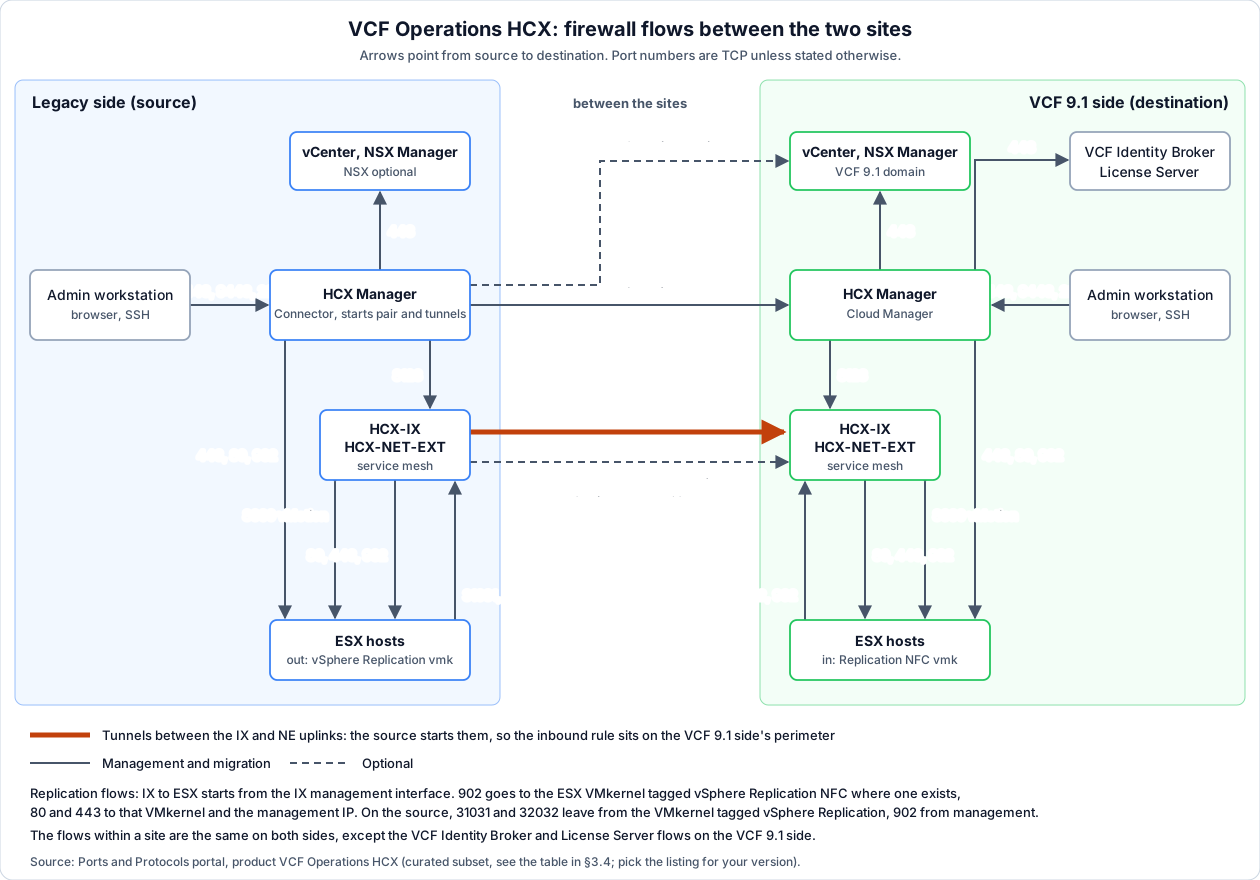
The flows that most often need a change request, grouped like the diagram:
Between the sites (orange in the diagram: the tunnels)
| Source | Destination | Port(s) | Proto | Purpose |
|---|---|---|---|---|
| Source HCX Manager | Destination HCX Manager | 443 | TCP | Site pairing |
| Source IX / NE (uplink) | Destination IX / NE (uplink) | 4500 | UDP | Tunnels (IKEv2) |
| Source IX / NE | Destination IX / NE | 4500–4628 → 4500 | UDP | Application Path Resiliency (optional) |
| Source HCX Manager | Destination vCenter | 443 | TCP | Entitlement Server for licensing (optional, see §6) |
Management, within each site
| Source | Destination | Port(s) | Proto | Purpose |
|---|---|---|---|---|
| HCX Manager | vCenter, NSX Manager, ESX | 443 | TCP | Integration, service mesh deployment |
| HCX Manager | ESX | 80, 902 | TCP | Service mesh deployment |
| HCX Manager | HCX-IX | 8123 | TCP | Bulk migration control |
| HCX Manager (VCF 9.1 side) | VCF Identity Broker, License Server | 443 | TCP | VCF SSO, licensing |
| Management workstations | HCX Manager | 443, 9443, 22 | TCP | UI, appliance management, SSH |
Migration data between the IX and the ESX hosts, within each site. Which interface each end uses decides the IPs in the rule (see below):
| Source | Source interface | Destination | Destination interface | Port(s) | Proto | Purpose |
|---|---|---|---|---|---|---|
| HCX-IX | per the compute profile | ESX | vMotion VMkernel | 8000 | TCP | vMotion, both ways |
| HCX-IX | management IP | ESX | management IP, and the NFC VMkernel where one exists | 80, 443 | TCP | ESX authentication |
| HCX-IX | management IP | ESX | NFC VMkernel where one exists, else management | 902 | TCP | Bulk migration data path |
| ESX | vSphere Replication VMkernel where one exists, else management | HCX-IX | Replication network profile IP where one is set | 31031, 32032 | TCP | Bulk replication, unencrypted / encrypted |
| ESX | management | HCX-IX | per the compute profile | 902 | TCP | Cold migration |
These tables cover vSphere sources: Bulk, RAV, vMotion, cold migration and Network Extension. OS Assisted Migration (Hyper-V/KVM sources only) needs its own flows, starting with 443 from every guest to the HCX-SGW (KB 390273); filter the Ports portal on Purpose OSAM.
The IX-to-ESX rows are the ones that show up later as migration errors rather than at deployment: with 443 from the IX to the target ESX hosts closed, a Bulk or RAV migration stalls with “Storage not accessible error observed” (KB 447075); with 902 closed, a reverse migration fails with the same message (KB 393791); with 31031 (“or 44046 for RAV”) closed from the ESX hosts to the IX, the base sync stays at 0% (KB 319757). That 44046 comes from the KB only: the portal’s 9.1.0 and 9.1.1 listings don’t name it and give 31031 and 32032 for the ESX-to-IX replication flow (read 2026-11-16), so open those for 9.1. The HCX Manager-to-IX 8123 row (“HCX Bulk Migration Control”) is in both listings. The IX-to-ESX 902 row is in the portal’s 9.1.0 listing, not in its 9.1.1 listing (captured 2026-09-23); KB 393791 needs it either way. So does the forward direction: a Bulk or RAV migration that hangs in “Initial Sync in Progress” with “Storage not accessible error observed” “is typically caused when port 902 is not open on the target side” (IX to ESX), while “Running the HCX Diagnostics from the Service Mesh reveals no port blocks/errors” (KB 432334, HCX 9.0). Open 902 from the IX to the hosts on both sides, and don’t take a clean diagnostics run as proof that it’s open.
Because the source starts the tunnels, the inbound rule sits on the VCF 9.1
side’s perimeter. Add these flows to your copy of
07-firewall-ports.md §G.
Replication and NFC VMkernels: the flow goes there, not to vmk0
The portal names “ESX Management IP addresses” for the replication flows. That is only right when the hosts carry replication on vmk0. Bulk migration and RAV use vSphere Replication, with the HCX-IX as the replication server, and ESX sends and receives replication traffic on the VMkernel that is tagged for it:
- Source hosts, outgoing: “vSphere Replication traffic: Handles the outgoing replication data that the source ESX host transfers to the vSphere Replication server”. On a host with a VMkernel tagged vSphere Replication, the 31031 / 32032 flow to the source IX leaves from that VMkernel’s IP, not from vmk0.
- Target hosts, incoming: “vSphere Replication NFC traffic: Handles the incoming replication data on the target replication site” (vSphere 9.1, The VMkernel Networking Layer). On a host with a VMkernel tagged vSphere Replication NFC, “The vSphere Replication hbrsrv service routes the replication data to the adapter” (Set Up a VMkernel Adapter for vSphere Replication Traffic on a Target Host). So the target IX’s flows to the host (902, and 443 per KB 447075) go to that VMkernel’s IP, not to vmk0. KB 447075 describes exactly this case: the test “might fail on a specific VMkernel interface with the replication service enabled (e.g., vmk1), while succeeding on others (e.g., vmk0)”.
- The IX side is different: “The HCX appliance always uses its Management interface for vSphere Replication NFC traffic”, also when the IX has a dedicated Replication network profile, which “cannot be used for vSphere Replication NFC VMkernel traffic” (Network Profile Considerations and Concepts). The source of the IX-to-ESX rule is the IX’s management IP. The other direction, ESX to the IX on 31031 / 32032, lands on the IX’s Replication network profile IP when the compute profile has one: “the HCX Interconnect uses a Network Profile configuration dedicated to the vSphere Replication traffic” (same page, read 2026-11-17). The page doesn’t say which IX interface takes that traffic without a Replication profile, so read the IX’s IPs from the service mesh before you write that rule.
In practice: per host, list which VMkernel carries vSphere Replication and which carries vSphere Replication NFC, and write those IPs (not vmk0’s) into the rules above. Keep the management IPs for 80 and 443 as well. Only one VMkernel per host should be tagged for vSphere Replication (KB 319757).
4. Deploy HCX on the VCF 9.1 side
The 9.1 release notes add lifecycle management of VCF Operations HCX to VCF Operations, with two TechDocs procedures: Deploy VCF Operations HCX and Import Existing VCF Operations HCX to a VCF Domain (What’s new: VCF Operations 9.1). The click-path below follows Broadcom’s blog walkthrough (part 1, built on 9.1.0); check it against the TechDocs procedure for your build.
Download the binary:
- In VCF Operations, go to Build → Lifecycle → VCF Instances and open the instance.
- Binary Management tab → INSTALL BINARIES → select the latest VMware Cloud Foundation Operations HCX → DOWNLOAD.
Deploy the manager:
- Select the domain HCX should serve. HCX is installed per domain, next to that domain’s vCenter and NSX.
- Software Versions tab → MANAGE COMPONENTS → VCF Operations HCX tile → INSTALL.
- General: pick the downloaded version.
- Deployment Settings: the HCX Manager FQDN (the DNS record must exist) and the admin and root passwords. That’s all you enter: the management domain components handle placement and the vCenter / NSX registration.
- Validation must pass, then Summary → FINISH.
HCX is an optional component: it’s on the Manage Components page next to
Avi, and is included in the VCF entitlement (see
14-avi-load-balancer.md for how that page separates
optional components from paid add-ons).
Certificates: 9.1 manages HCX certificates from VCF Operations too, so replace them there, not in the HCX appliance UI. If you import an existing HCX Manager instead, its certificate needs a SAN: one without fails the import with a CN/SAN mismatch (KB 445282).
SSO: VCF SSO for HCX goes through the VCF Identity Broker; see
12-sso-configuration.md Step 5.
5. Deploy HCX on the legacy side
The legacy vCenter isn’t part of the VCF instance, so this side is a manual OVA deploy (blog part 1, installs):
- Download the VCF Operations HCX OVA (the same file as the destination, same version) from the Broadcom Support Portal.
- Deploy it to a legacy cluster with Deploy OVF Template: FQDN, IP, gateway, DNS, NTP and passwords.
- Log in to the appliance management interface (
https://<fqdn>:9443) and connect it to the legacy vCenter and its SSO domain. You needadministrator@vsphere.localor an equivalent account. - Connect it to the legacy NSX Manager only if you will extend NSX networks from the legacy side.
- Check the version matches the destination before going on (see §1.1).
Proxy, on either side: if the HCX Manager reaches the internet through a proxy (appliance management interface → Administration → Proxy), fill in Proxy Exclusions with the local networks, hosts and domains. Without them, “Thumbprint exchange with HBR server on appliance … failed” shows up, and a proxy “without these local exclusions generally leads to migration failures”. After changing it, restart the HCX Manager services (KB 402723).
6. Licensing: the legacy side inherits
The legacy side needs no local licence key. It inherits the VCF destination’s entitlement through the service mesh. Until the site pair and service mesh are up, the legacy manager shows Evaluation Mode, which is expected (KB 440126).
- The evaluation end date doesn’t stop migrations: “even after the evaluation period ends, the site will remain operational as long as it is site-paired with the VCF-enabled cloud infrastructure” (KB 418818). Field-seen 2026-11-17: a legacy HCX Manager on 9.1.1 stayed in Evaluation Mode while Bulk migration ran.
- Optional: register the legacy manager against the destination vCenter
as its Entitlement Server (appliance management on 9443 → Configuration →
Licensing → vCenter Entitlement Server), so it picks up the VCF subscription
directly and the evaluation banner may clear (KB 418818). It gives
“license entitlement only”: the destination vCenter’s inventory doesn’t
show in HCX
(Add an Entitlement Server,
HCX 9.0 page, last updated 2025-02-25; no 9.1 page). This needs a flow the
pairing alone doesn’t: legacy HCX Manager → destination vCenter, TCP 443,
across the sites (the optional row in §3.4).
Neither the KB nor the page gives the URL format or the account; use the
vCenter’s
https://<fqdn>and an SSO account in the vCenter Administrators group, which KB 445017 requires for license discovery on the vCenter registration (not confirmed for this option). - Keep outbound HTTPS open: if the legacy side loses the destination for more than 10 minutes, it can drop back to evaluation status until the next poll.
Licensing problems seen on HCX 9.x:
| Symptom | KB |
|---|---|
| HCX doesn’t detect a licence assigned through SDDC Manager | KB 422680 |
| ”Failed to get vCenter license expiry details” | KB 445017 |
| VCF 9 licence can’t be activated: the wrong appliance type was deployed; redeploy the VCF-integrated HCX | KB 437122 |
| Evaluation Mode on the initiator | KB 418818 |
The hidden Cross Cloud Mobility sheet in the P&P workbook still asks for an HCX License key. That field comes from the older VMware Cloud on AWS design and doesn’t apply to HCX 9.x.
7. Site pair, profiles and service mesh
Done in the legacy HCX Manager’s UI, because the source starts everything. Broadcom’s blog part 2 walks through the screens.
- Site pair: add the destination HCX Manager’s URL and credentials. Check the versions first: a 4.x/9.x pair is created without warning (KB 427904).
- Network profiles on both sides, from §3.2.
- Compute profiles on both sides: which clusters and datastores to deploy appliances into, which clusters can be migrated, which services to turn on (migration types, NE, WAN-OPT), and which network profiles to use for each traffic type.
- Service mesh: pair a source compute profile with a destination one, set the NE appliance count per switch and turn on NE HA if you want it. HCX deploys the IX, NE and WAN-OPT appliances on both sides.
- Check the service mesh shows all tunnels up and run the built-in diagnostics before you extend a network or migrate anything.
8. Extend networks
Network Extension stretches a legacy layer 2 network into NSX on the VCF 9.1 side, so a VM keeps its IP and gateway when it moves. Everything below is from the VCF 9.1 HCX user guide, section Extending Networks with VMware HCX (pages last updated 16 November 2026), unless a KB or blog is named.
8.1 How an extension works
“Network extension is a layer-two bridging function that is initiated at the source site” (Extending Networks). A Network Extension (NE) appliance on each side bridges the network over the service mesh tunnel; a VM that moves keeps its addresses: “Retain the IP and the MAC addresses of the VM, and honor existing network policies” (About Network Extension).
The gateway does not move with the network: “With network extension, the default gateway for the extended network is only connected at the source site” (same page). Routed traffic of a migrated VM therefore goes back through the extension to the legacy gateway, unless you turn on MON (§8.4).
8.2 What can be extended, and what to keep out
Source and target types, verbatim from Requirements for Network Extension: “VCF Operations HCX supports extending networks from VMware vSphere Distributed Switches, NSX segments under default project, and NSX Virtual Private Cloud (VPC) subnets. HCX also supports extending networks to vSphere DVPG as the destination.”
| Supported | Not supported | |
|---|---|---|
| Legacy-side source | vDS port groups; NSX overlay or VLAN segments (NSX 3.2.3+, registered with the same vCenter as HCX, hosts are transport nodes); VPC subnets (HCX and NSX 9.0+ on the source) | vSphere Standard Switch port groups; segments in a user-created NSX project |
| VCF 9.1-side target | NSX segment on a Tier-1, NSX VPC subnet, NSX VLAN segment, or a vDS port group (DVPG to DVPG: HCX and NSX 9.1 on both sites) | NSX projects other than the default |
The default project only limit is easy to miss on a VCF 9 destination designed around NSX projects. It was reported on 4.x and 9.0.x (KB 378638), and the 9.1 requirements page still says “default project”. Plan the target VPC or Tier-1 in the default project, or plan a re-IP instead.
Never extend infrastructure networks: “Never use VCF Operations HCX to extend the vSphere Management network or other VMkernel networks (for example: vMotion, vSAN, replication) to the remote site” (requirements).
Rules that prevent an outage (Restrictions and Limitations for Network Extension):
- “Virtual machine networks must only be extended with a single solution.” Not HCX next to another L2 stretch for the same network.
- “Virtual machine networks with shared or overlapping VLAN configurations must not be extended to the same destination router.”
- A network that spans more than one vCenter “must not be extended from more than one vCenter Server to the same destination router”.
- “Network extension does not detect or mitigate loops”, nor IP or MAC conflicts. Check these yourself.
- “Secondary subnets in a single layer-2 network” are not supported.
- The upstream switch “must be configured to accept (not filter out) RARP (reverse ARP) packets” (requirements).
Capacity: one network goes through one appliance pair; “multiple network appliances cannot be used to increase throughput” (restrictions). With NSX at the destination, “Additional network extension appliances are required when extending more than 8 networks”, or more than 7 with enhanced service mesh appliances, where “a single vNIC of the appliance gets used for as many as 128 extensions” (requirements). One appliance “can only connect to one vSphere Distributed Virtual Switch or NSX Transport Zone” (restrictions). Plan the NE appliance count per switch in the service mesh (§7).
Other limits worth knowing (restrictions): “VMware NSX Traceflow does not work with extended networks”; an existing target segment with the same gateway IP and prefix is reused, and HCX “disconnects the NSX router interface from the network”, so anything that already used that gateway on the target loses it; and with NSX Federation “you cannot extend a new network or enable/disable Mobility Optimized Networking (MON) for an already extended network”.
8.3 Extend a network, step by step
From Extending Networks, in the source HCX Manager:
-
Network Extension, then Extend Networks, and select the service mesh.
-
Filter on the network type and select one or more source networks; Next.
-
Per network, depending on the target:
Target You enter NSX overlay segment Destination First Hop Router (the NSX Tier-1), the gateway IP and prefix ( 192.168.10.1/24), the NE appliance, and optionally Mobility Optimized NetworkingNSX VPC subnet The VPC as first hop, gateway IP and prefix, and the access mode: Public, Private or Private_TGW NSX VLAN segment The destination VLAN ID and the NE appliance that supports VLAN vSphere DVPG The destination VLAN ID and the NE appliance that supports VLAN on DVPG -
Under Settings - optional, four checks that HCX applies by default and that you can lift per extension: Allow Overlapping Source VLAN, Allow Overlapping IP Subnet (by default HCX “blocks attempts to extend the same subnet to the same Tier 1 gateway or the same VPC”), Allow Overlap with Network Profiles (a gateway IP inside an HCX network profile range) and, for VLAN only, Allow Overlapping Destination VLAN. Leave them on unless you know why the overlap is safe.
-
Validate to check the input without extending, then Submit. Requests on the same appliance queue behind each other.
Check. The extension shows as extended, a test VM on the target side of the network pings its gateway (at the source) and a VM that is still at the source.
8.4 Mobility Optimized Networking (MON)
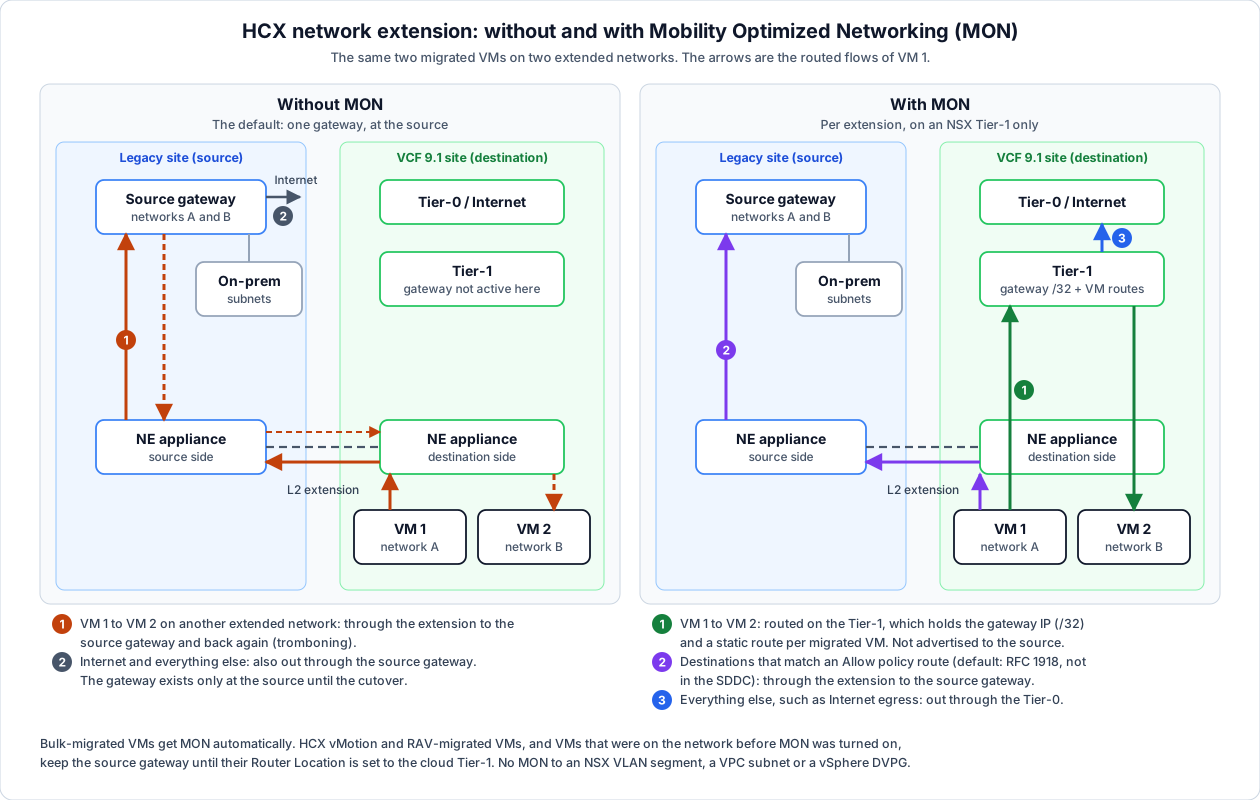
The problem it solves. Without MON “all routed traffic for migrated workloads is directed back to the source-site gateway” (Understanding MON). Two migrated VMs on different extended networks talk via the legacy router and back again: “The network tromboning effect is observed when virtual machines in the destination connected to different extended segments communicate” (About MON). Internet traffic also leaves at the source, and the extension carries all of it.
What MON changes (About MON), per extension:
- HCX activates the gateway IP on the destination Tier-1: “It is enabled with a limited /32 network mask.”
- Per migrated VM it adds “a virtual machine specific static route” on that Tier-1, so the VM is reachable locally. “This VM static route is not advertised to the on-premises environment.”
- Traffic to a network on the same Tier-1 is routed there, without the trip to the source.
- For everything else the MON policy routes decide (Policy Routes): “If the destination IP is matched and configured as allow in the MON policy configuration, the packet is forwarded to the premises gateway using the HCX network extension appliance.” and “If the destination IP is not matched, or configured to deny in the MON policy, the packet is forwarded to the SDDC Tier-0 to be routed.”
Default policy routes. “The default MON policy includes all RFC-1918 networks”: private destinations that are not on the target go to the source router, and the policy “sends internet egress traffic to the SDDC tier-0 router” (Example Policy Route Configurations). Two variants on that page:
- Internet egress stays at the source (for example because the source firewall must see it): remove the RFC 1918 entries and “Add a single Allow entry for network 0.0.0.0/0”.
- Cloud services reached locally: add their ranges as Deny entries. This page says “Deny entries are sent to the Tier-1 router”, the Policy Routes page says the Tier-0. They describe the same path: KB 395509 puts it as “Traffic stays in the cloud and uses the Tier-1/Tier-0 gateway”, for a Deny match and for no match alike. The VM’s Tier-1 routes it, and anything not on that Tier-1 goes on to the Tier-0.
Read Allow and Deny the way KB 395509 warns: they “have counterintuitive meanings”. Allow sends the traffic back to the source, Deny keeps it at the target. The KB adds that the most specific prefix wins, not the order of the list, and that policy routes “only affect traffic when the VM gateway is migrated to the cloud”.
Policy routes are set per site pair: Network Extension, Advanced tab, Policy Routes, Add, network and prefix, Redirect to Peer Allow or Deny, Submit (Configure Policy Routes).
Which VMs use it. This is the part that surprises people (About MON, Configuring MON):
| VM | Gateway after migration |
|---|---|
| Bulk-migrated | ”automatically MON-enabled”: Router Location is the cloud Tier-1 |
| HCX vMotion or RAV-migrated | ”use the on-premises gateway until they are specifically configured to use the cloud gateway” |
| On the network before MON was turned on | Same: the source gateway until you set it |
So after a vMotion or RAV wave, set the Target Router Location per VM: Network Extension, expand the extension, select the VMs, pick the destination router, Submit. To take a VM off MON, set it back to the on-premises router. KB 321599 describes the same split for a MON-enabled network.
Requirements (Requirements and Limitations for MON):
- “VMware Tools must be installed” in the VM.
- “An NSX Tier-1 router connected to a Tier-0 router must exist in the destination site prior to enabling this feature.”
- “The default gateway IP and the DHCP Server IP cannot be the same.”
- Not for an extension to an NSX VPC subnet, an NSX VLAN segment or a vSphere DVPG (restrictions).
Limitations (MON requirements):
- “MON does not provide traffic optimization from MON-enabled virtual machines to virtual machines on other extended networks without MON.” Turn it on for all extensions of an application, or for none.
- “MON provides optimization in the Cloud.” “MON does not provide optimization in the source.” VMs that are still at the source keep using the source gateway.
- A VM with several NICs on MON networks: a Router Location change “applies to all the interfaces”.
- After a Network Extension HA failover, “policy-routed Mobility Optimized Networking (MON) traffic takes longer to recover than non-policy routed traffic” (HA).
When to turn it on. MON makes the target route traffic that the source used to route, so a source-side firewall or router no longer sees the traffic between migrated VMs, and Internet egress moves to the Tier-0 unless you change the policy. Agree with the network and security team before you enable it: which flows may leave locally (policy routes), and which rules must exist on the target’s gateway firewall or DFW first. Without that agreement, leave MON off: the extension then works as plain L2, slower but with one routing point.
8.5 High availability for the NE appliances
“Network extension High Availability protects extended networks from a network extension failure at either the source or remote site” (Understanding Network Extension High Availability):
- It “requires four network extension appliances, with two appliances at the source site and two at the remote site”, forming an HA group. Standby appliances take IP addresses from the network profile pool, so size the pool for them (§3.2).
- Active/Standby, a heartbeat between the pairs, and “without pre-emption, with no automatic failback”. HCX places Active and Standby on separate hosts with DRS anti-affinity.
- It “provides only appliance level resilience”: uplink resilience comes from Application Path Resiliency or several uplinks. “More than one appliance failure in the same HA setup at the same time disrupts the network extension service.”
8.6 Unextend at the cutover
Unextending is the network cutover: the moment the gateway of a network moves from the legacy router to NSX. Quotes are from Removing a Network Extension (last updated 16 November 2026).
What it removes, and what it leaves. Removing an extension “prevents further cross-site communications between virtual machines residing on that network”, which is “typical when the source side network is vacated”. It takes away the bridge and nothing else: “Unextending a network removes the L2 bridged path without removing the NSX segment or Port group, or NSX interface.” The migrated VMs stay on the NSX segment with their IP addresses. The question is who serves their gateway afterwards, and that depends on one option.
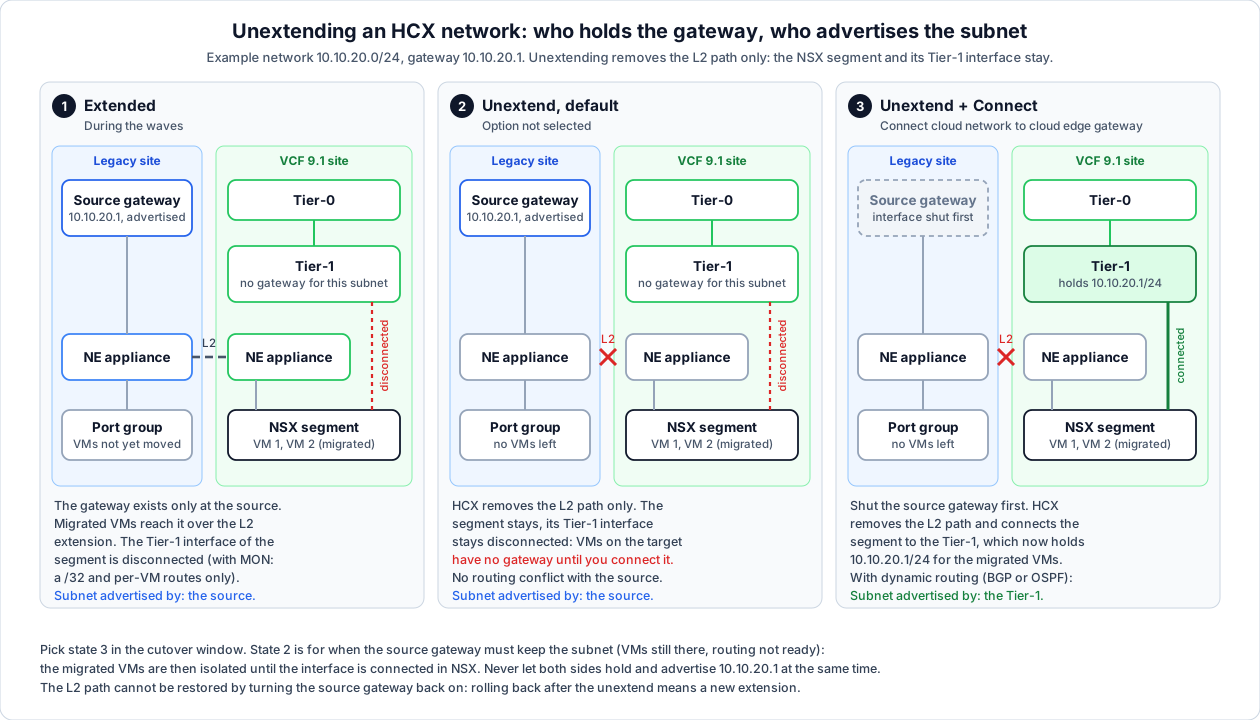
The three states, as in the diagram:
| State | Gateway 10.10.20.1 | Subnet advertised by | Migrated VMs |
|---|---|---|---|
| 1. Extended | Source router only (with MON also a /32 on the Tier-1, §8.4) | Source | Reach the gateway over the extension |
| 2. Unextended, default | Source router; the Tier-1 interface stays disconnected | Source | No gateway: cut off from other subnets until the interface is connected in NSX |
| 3. Unextended with Connect cloud network to cloud edge gateway after unextending | Tier-1 | Tier-1, through the Tier-0 when dynamic routing is on | Routed by NSX |
Why the default is state 2: “By default, the cloud segment/VPC subnet is left disconnected from the edge gateway/VPC respectively after removing the network extension”, to avoid a routing conflict with the on-premises network. With the option set, HCX “connects the segment to the Tier 1 gateway”, and “If dynamic routing is activated, the network is advertised from the Tier 1 gateway.” Without it, the NSX router interface stays disconnected.
State 2 has a use: a network whose source side must keep its gateway (VMs that stay behind, routing not ready). Then you connect the Tier-1 interface later in NSX, in its own window. For a normal cutover, aim for state 3 and never let both routers hold and advertise the same gateway.
The options on the unextend dialog (expand the network entry before you click Unextend):
| Option | What it does | When |
|---|---|---|
| Connect cloud network to cloud edge gateway after unextending | Connects the segment (or VPC subnet) to its Tier-1 (or VPC) after the L2 path is removed | The cutover, once the source gateway is shut |
| Block reuse of subnet CIDR after subnet (VPC; the label as TechDocs writes it) | Blocks reuse of the subnet CIDR, to avoid inconsistent routing from the destination to the source while the source VPC subnet is still in use | Source is an NSX VPC subnet that stays in use |
Unextend or Force Unextend. Actions, Unextend Networks is the normal path. Force Unextend is for when that fails: the NE appliance is in a bad state, the source components no longer exist, or the source site is powered off. In the last case unextend from the target side, so the destination router stays connected to the segments that hold migrated VMs.
The cutover, in order. TechDocs gives the dialog, not the sequence; this is the order that keeps one gateway at a time:
- The network is empty at the source. No VM, appliance or physical host uses the source port group any more; a device left behind loses its route to everything on the target.
- Services checked. Migrated VMs that use a DHCP server at the source, or static DNS or NTP there, “can lose those services after unextending a network”. Move them or give them a route first.
- Firewall ready. From now on NSX routes this subnet, so the gateway firewall and DFW on the target must hold the rules the source router or firewall enforced (VCFUpgradeGuide docs/31).
- Window agreed with the network team. Shut the source gateway interface (or remove the subnet from the source routing) and wait until the route is gone upstream.
- Unextend with Connect cloud network to cloud edge gateway after unextending set.
- Check: the route to the subnet points at the VCF side upstream, a migrated VM pings its gateway and a host on another network, the application test passes.
Rollback before step 5 is turning the source gateway back on. After step 5 the L2 path is gone, so the source gateway no longer reaches the migrated VMs: rolling back means disconnecting the Tier-1 interface and extending the network again. Agree beforehand whether that is the plan or whether you fix forward.
With MON. The Tier-1 already holds the gateway as a /32 plus a route per VM. The 9.1 TechDocs don’t say what unextend does with those. KB 321599 only says to tick the option for a MON network: “Make sure to check “Connect Cloud Network” option, if the interface on the cloud T1 gateway must be connected upon removal to allow for L3 connectivity.” The older VMware HCX technical paper Mobility Optimized Networking with HCX and VMC (26 March 2021, written for VMware Cloud on AWS, where the option was called Enable Cloud Gateway) describes it:
| Unextend of a MON network | Per-VM static routes | Gateway on the Tier-1 |
|---|---|---|
| Option checked | ”The virtual machine static routes are removed.” | Enabled: “The segment behaves like an SDDC native routed network.” |
| Option unchecked | Removed | ”The Compute Gateway assignments remain, in a disabled state.” The segment is disconnected |
The same paper on turning MON off on an extension that stays: the Tier-1
interface “is set to disconnected, and it is changed from the /32 assignment
to the original subnet”, the VM routes are removed, and routed traffic goes
back to the source gateway. That’s the 2021 VMC behaviour; it fits the 9.1
text, but check once in the proof of concept that the Tier-1 shows the full
prefix (/24 in the example) after the unextend.
9. Choose a migration type per workload
| Type | Downtime | Use for | Watch out for |
|---|---|---|---|
| Bulk | Reboot at switchover | Most VMs: many in parallel, scheduled switchover window | Replication runs ahead; the VM restarts on the VCF side |
| HCX vMotion | None | Single VMs that can’t go down | One at a time; needs VM hardware version 9 or later |
| Replication Assisted vMotion (RAV) | None | Many VMs without downtime | Replication plus a vMotion switchover; vVols destinations aren’t supported |
| Cold | VM is off | Powered-off VMs and templates | Nothing runs during the move |
| OS Assisted (OSAM) | Reboot | Non-vSphere sources | Needs SGW (source) and SDR (destination) and the Guest Network profile; for single-site use the OSAM service must be at the destination |
The vMotion hardware version rule is quoted from installs; the others are summarised from the user guide, so check the per-type restrictions in About Administering VMware Cloud Foundation Operations HCX for your build.
Check every VM against the destination hosts before it’s in a wave (System Requirements):
- The destination hosts must support the VM’s hardware version and VMware Tools version.
- Check the EVC / CPU baseline for the vMotion-based types.
- RDMs, independent disks, snapshots and attached ISOs block or slow some migration types. Clean them up before the wave.
10. Run the migration waves
- Proof of concept first. TechDocs suggests success criteria like: extend two test networks, live-migrate a VM, test L2 connectivity over the extension, reverse-migrate a VM, bulk-migrate a VM (installs).
- Group VMs into waves by application, network and downtime tolerance. Move an application’s VMs together so its traffic doesn’t cross the extension longer than needed.
- Schedule switchover windows for Bulk and RAV; replication can start days earlier.
- Watch the migration dashboard and the service mesh health during each wave.
- Rollback: a VM can be migrated back the same way (reverse migration). Keep the legacy capacity until the wave is signed off.
11. Decommission HCX
When everything has moved:
- Unextend every extended network (the cutover in §8.6).
- Delete the service mesh, which removes the IX, NE and WAN-OPT appliances on both sides.
- Remove the site pair.
- Retire the legacy HCX Manager and the legacy environment.
- Decide whether to keep the VCF 9.1-side HCX Manager for later migrations, or remove it from Manage Components in VCF Operations. Close the HCX firewall rules either way.
12. Known issues and field notes
| Issue | Source |
|---|---|
HCX 4.x crashes vCenter 9.1’s vmware-envoy-hgw: upgrade HCX first | KB 450437 |
| A 4.x/9.x site pair is created without warning but isn’t supported | KB 427904 |
| Migrate Service Mesh fails from 9.0.x to 9.1.0; re-sync the mesh | KB 449280 |
| Import into VCF Operations fails on a certificate without a SAN | KB 445282 |
| Tier-1s in user-created NSX projects aren’t selectable for NE | KB 378638 |
| ”Storage not accessible error observed” during initial sync, diagnostics clean: 902 closed from the IX to the target hosts | KB 432334, §3.4 |
| ”Thumbprint exchange with HBR server … failed”: proxy without local exclusions | KB 402723, §5 |
| Licensing symptoms on 9.x | §6 |
HCX is FIPS 140-3 certified as of 9.1 (What’s new: VCF Operations 9.1).
The workbook
The 9.1 P&P workbook (v1.9.1.001) has a hidden Cross Cloud Mobility
sheet: HCX service account and role, VM folder and resource pool, an inbound
firewall rule, the HCX Connector name / IP / passwords, the remote HCX URL, and
the management and vMotion IP ranges. It was written for the older Cross
Cloud Mobility for VMware Cloud Foundation (VMware Cloud on AWS) design: its
example remote URL is a VMware Cloud on AWS SDDC, and it asks for a licence key
HCX 9.x doesn’t use. It’s a useful checklist of what to collect, which
02-intake.md H15 covers, but don’t transfer answers into it.
The 9.1.1 workbook no longer has the sheet.
References
- VCF Operations HCX Installations (TechDocs, VCF 9.1)
- Software Version Requirements (TechDocs, VCF 9.1)
- System Requirements (TechDocs, VCF 9.1)
- Requirements for Network Extension (TechDocs, VCF 9.1)
- What’s new: VCF Operations 9.1 (VCF 9.1.0 release notes)
- Broadcom blog series, The Complete Guide to Workload Mobility with VMware Cloud Foundation Operations HCX 9.1: part 1, deployment; part 2, profiles, site pair and service mesh; part 3, network extension and migration
- Broadcom Interoperability Matrix, Ports and Protocols, Product Lifecycle